
Pumble vs Slack (2026): Pricing, Free History & Migration
Compare Pumble vs Slack on free message history, costs for 10-50 people, guest billing, integrations, and migration limits before moving your team's chat.

Key takeaways
Pumble Free includes unlimited users and message history, but shared file storage, app counts, meetings, guests, and governance still have plan boundaries.
Slack Free's ninety-day search window is different from retained public-message exports and one-year deletion. Free exported file links have their own ninety-day limit.
Twenty-five constantly billable Pro users cost $747/year on Pumble versus $2,175/year on Slack with annual billing. Features, credits, taxes, and migration costs remain separate.
Pumble charges purchased seats, including pending workspace invitations and unremoved empty capacity. Slack's eligible fair billing issues account credits for inactive paid members—not cash refunds.
Pumble workspace guests require Business; Slack guests start on paid Pro. A meeting-only visitor is different, and importing conversation links does not migrate original files.
Quick Verdict: Choose the Workflow, Not Just the Lower Seat Price
Pumble is worth shortlisting when a small team mainly needs channels, direct messages, and searchable history without a subscription, or lower-cost paid meetings. Slack is worth keeping when the team's actual apps, Workflow Builder processes, or cross-company Slack Connect relationships justify its higher price. A cheap chat subscription is not a saving if the migration breaks customer handoffs or requires another tool to recreate essential work. Conversely, paying for an ecosystem is hard to justify if the team only uses basic messages.
The most consequential differences are less obvious than the familiar interface. Pumble bills purchased seats, including unused capacity unless removed; Slack's eligible self-service plans use active-member billing and account credits. Slack Free's ninety-day search window is different from its retention and export boundaries. Pumble can import supported Slack conversations, but cannot supply content Slack never exported or recreate original attachment files merely by preserving links. This guide makes those buying and migration decisions explicit.
Research method: AI-assisted research and writing using official pricing, billing, guest, integration, retention, and export documentation checked October 8, 2026. Prices are standard USD rates with billing cycles stated; budgets are calculated examples, not customer savings. No hands-on call-quality, uptime, search-speed, productivity, or migration benchmark was performed. The cover is an illustrative workspace photograph, not a screenshot of either product. For product context, see the Pumble review and Slack review; for a wider shortlist, use the team communication category.
Free Plans: Searchable History Does Not Mean Every Feature Is Free
Pumble's pricing page documents unlimited Free users, channels, and message history, with ten gigabytes of storage for the entire workspace. Free includes one-to-one voice/video meetings and up to three apps or integrations; native Clockify and Plaky integrations do not use that allowance. Group meetings and screen sharing begin on Pro. Workspace guest roles and broader permission controls begin on Business. A team can therefore fit the free messaging plan while still needing a paid tier for a guest-restricted client channel or group call.
Slack's dedicated Free-limits guide specifies ninety-day message/file visibility and ten third-party or custom app installations. Its current plan matrix also lists ten, with one-to-one huddles and no native Workflow Builder on Free. A separate Slack paid-versus-free marketing page has inconsistent app-count wording; verify the workspace allowance if that limit decides the purchase. This guide follows the dedicated limit documentation rather than quietly choosing the most generous interpretation. It does not assume an unsupported fifty-user Free cap.
A free plan also needs to survive the trial ending. Pumble's trial guide describes a seven-day Enterprise-feature trial; returning to Free removes higher-tier features, including guest access. If a contractor could join during evaluation, that does not establish ongoing free guest collaboration. Record the lowest plan supporting the whole job, not the temporary screen shown on signup. Our free small-business software guide supplies broader options, but the comparison below separates free chat, storage, integrations, and collaboration instead of treating free as unlimited everything.
| Requirement | Pumble Free | Slack Free |
|---|---|---|
| Searchable message history | Unlimited history for permitted conversations, subject to deletion | Most recent 90 days; retained and deleted data have separate rules |
| File boundary | 10 GB shared across the workspace | 90-day visibility; ordinary retention up to one year or configured 90-day deletion |
| Apps and integrations | Up to 3, plus exempt Clockify and Plaky integrations | 10 under the current dedicated limits guide and plan matrix |
| Native group meetings | Not included; 1:1 meetings included | Not included; 1:1 huddles included |
| Workspace guest accounts | Business or Enterprise required | Paid plan required, including Pro |
| Workflow/API distinction | API add-on available, subject to setup and limits | App installations are not a Free Workflow Builder entitlement |
Slack History: Ninety-Day Visibility, Retention, and Export Are Different
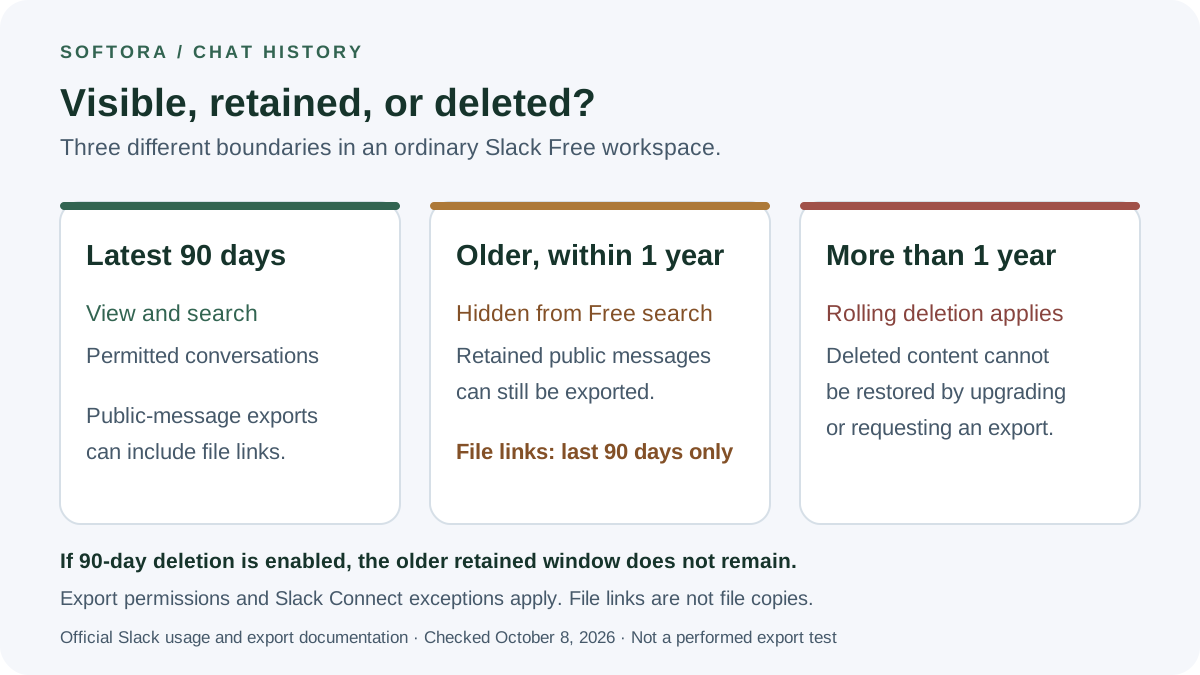
On an ordinary Slack Free workspace, ninety days is the window users can view and search, not necessarily the moment every older message is erased. Owners can keep messages and files for one year or choose deletion after ninety days. Under the one-year setting, hidden older content can remain retained until rolling deletion applies. Upgrading can expose retained history, but cannot recover content already deleted. Pinned or saved status should not be treated as a backup or an exemption from retention rules.
Export introduces a third boundary. Read together, Slack's import/export guide and export instructions allow authorized public-channel message exports from retained history beyond the visible ninety days, within the ordinary one-year Free window. However, Free exports include file links only from the last ninety days. This is not a promise of a full year of downloadable attachments. Pumble's importer guide currently says hidden ninety-day-old Slack data cannot be exported; that blanket statement conflicts with Slack's own documentation. Inspect the authorized export rather than relying on the receiving vendor's summary.
For example, a public message from six months ago may be hidden in Slack Free yet present in an authorized export if one-year retention kept it. That does not prove its attachment link is included, that the file is retrievable, or that the same rule applies to a private conversation. If ninety-day deletion was selected, the older message is not available to rescue. Enterprise-sponsored Slack Connect channels have specific Free-team exceptions, so check those separately. Keep durable decisions in a maintained knowledge system such as Notion and important files in an appropriate storage and backup arrangement, not only in a chat scrollback.
Pricing for Teams of 10, 25, and 50: Compare the Same Billing Cycle
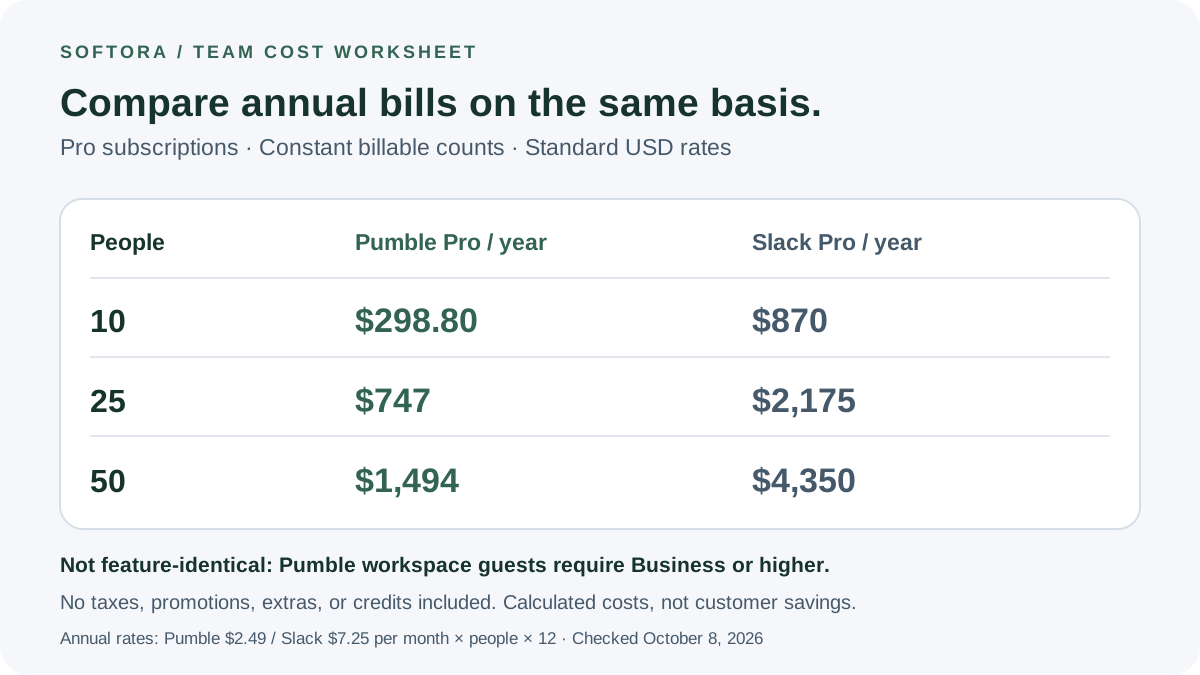
Standard Pumble Pro is $2.99 per purchased seat on monthly billing or $2.49 per seat per month billed annually. Slack Pro is $8.75 per user monthly or $7.25 per month billed annually under Slack's current pricing. The table assumes the same constant number of billable seats or members for the full period. Annual totals use the annual rate multiplied by twelve; they are not twelve payments at the higher monthly rate. Taxes, promotions, paid third-party apps, and any Slack billing credits are excluded.
At twenty-five continuously billable Pro users, Pumble costs a calculated $747 per year, compared with Slack's $2,175. The $1,428 difference is $119 per month of annualized subscription budget. That is a useful evaluation threshold, not proof that switching saves the business $1,428 overall. If recreating a critical Slack workflow adds more than $119 monthly in replacement software or measured staff effort, the subscription advantage can disappear. Include one-time migration and training separately using the SaaS spending framework.
Plan requirements change the comparison. Pumble Business is $4.99 monthly or $3.99 with annual billing, and Enterprise $7.99 or $6.99 respectively. Slack Business+ is $18 monthly or $15 with annual billing. Those similarly named plans are not equivalent bundles. For client guests, compare Pumble Business with Slack Pro before comparing more expensive security tiers. Slack's inspected introductory offer discounts the first three monthly payments for eligible new teams; the table intentionally uses standard rates. Recheck eligibility, renewal, currency, and negotiated terms rather than applying a promotion indefinitely or to annual subscriptions.
| Billable people | Pumble: monthly billing | Slack: monthly billing | Pumble: annual billing total | Slack: annual billing total |
|---|---|---|---|---|
| 10 | $29.90/month | $87.50/month | $298.80/year | $870/year |
| 25 | $74.75/month | $218.75/month | $747/year | $2,175/year |
| 50 | $149.50/month | $437.50/month | $1,494/year | $4,350/year |
Seat Billing: Pending Invitations and Departures Change the Real Invoice
Pumble's seat guide says active users and pending workspace invitations occupy seats. Empty purchased seats are still charged, and administrators must remove unneeded capacity to prevent its renewal. Deactivating a departing employee frees a seat for reuse; it does not automatically erase the purchased seat from the bill. This differs from simply multiplying today's headcount by the advertised price. Review invitations, contractors, deactivated accounts, and spare capacity before each renewal.
Slack's Fair Billing Policy applies to eligible website purchases paid by credit card or self-serve invoice. Invited members start being billed when they accept, and paid members inactive for more than twenty-eight days generate prorated account credits; deactivation has its own credit timing. These are nonrefundable credits for future Slack payments, not cash savings instantly returned to a bank account. If every member is inactive, a one-member minimum remains unless the workspace moves to Free. Do not assume a negotiated contract follows every self-service rule.
Consider an illustrative Pumble Pro workspace with twenty active members, five pending workspace invitations, and five additional empty seats: thirty purchased seats cost $89.70 each month. Twenty accepted active Slack Pro members would cost $175 monthly before credits or extras, with unaccepted invitations not yet billable. Pumble remains lower in this example, but quoting twenty times $2.99 would understate its actual purchased capacity. Name an owner for this reconciliation in your startup software stack; a billing model is only predictable when the team manages the unit it actually buys.
Client Collaboration: Workspace Guests Are Not Meeting Invitees
Pumble workspace guest accounts require Business or Enterprise, whereas Slack guest roles are available on paid plans including Pro. Both distinguish single-channel guests from multi-channel guests. Pumble permits five single-channel guests per purchased paid seat; Slack permits five per paid active member. Multi-channel guests are billed like members. For ten continuously billable internal members and five qualifying single-channel client guests, the annual base example is Pumble Business $478.80 versus Slack Pro $870, not the cheaper Pumble Pro total from the earlier table.
Pumble's meeting-link documentation separately allows people without Pumble accounts to join calls through paid-plan meeting links. An accountless meeting attendee is not a pending workspace invitation and does not acquire persistent channel access by attending. The pricing FAQ uses invited terminology in both contexts, so ask whether the person is joining the workspace or only a call. Meeting links remain valid after the original call; handle distribution and later admission deliberately rather than assuming a new meeting makes every old link unusable.
Guest access still needs a permission test. Slack guests can see history in their permitted channels and initiate DMs with members sharing those channels; changing a guest's channel membership does not terminate existing DMs. Slack Connect is another model, connecting separate organizations instead of creating an account in yours; Enterprise organizations can sponsor certain Free-team connections. An agency already collaborating in client-owned Slack channels may not replace that network simply by moving internal chat. Test both the contractor and client experience alongside the consultant software guide and Slack versus Teams comparison.
Integrations and Workflows: Count Working Actions, Not Directory Logos
Pumble has real integrations and an API, not just standalone chat. Its integration directory lists tools such as Google Drive, Jira, GitHub, and calendar connections; some other entries are marked coming soon. Free supports three installations, Pro ten, and Business/Enterprise unlimited, with Clockify and Plaky exempt from the count. Its API add-on is available on all plans. Listing private-channel messages requires the add-on bot's membership; channel and DM listings are scoped to the user who created the key. API access does not override export authorization. An unlimited installation allowance does not include every partner's subscription or prove that a specific two-way workflow exists.
Slack's Workflow Builder is a paid-plan feature, including Pro. Connector steps need third-party authentication and may need administrative approval. However, native conditional branching requires the newer Business+ package or Enterprise; do not attribute every demonstrated workflow capability to Pro. If an approval route branches by request type, identify that tier requirement before comparing it against a generic incoming webhook in another product.
Inventory five actual events: a Jira issue update, a ClickUp assignment, a HubSpot handoff, a support escalation, and an incident notification. For each, write the source event, visible context, permitted action, failure handling, and owner. A notification that links to a ticket is not equivalent to a button that updates it. If Zapier, Make, or n8n fills a gap, budget its usage and maintenance separately. Our automation comparison helps evaluate that additional dependency rather than assuming a lower chat bill removes operating work.
AI Features: Included Summaries and Metered Assistants Are Different
Slack's current plan matrix includes conversation summaries and huddle notes on paid plans, while search answers, recaps, and AI workflow generation belong to the newer Business+/Enterprise packages. The separate Slackbot usage guide sets Business+ at fifteen messages per member each week; Free/Pro access is normally a finite trial or preview rather than an indefinitely renewing allowance. Eligible Salesforce-connected workspaces can enable separately charged Flex Credits. AI included is therefore not the same as unlimited use of every AI capability.
Pumble's AI Assistant add-on is available on all plans but requires an owner or administrator to connect an AI provider with an API key. Direct assistant replies are visible only to the requester; responses to channel or group-DM mentions are visible to that conversation's members. The /ai-summarize command instead returns a temporary requester-only summary, including in a public channel. Summarizing private channels or group DMs requires the assistant's membership. Requester-only display does not mean the content avoids processing by the connected provider: evaluate provider usage costs and data handling separately from the chat subscription.
Before enabling an assistant, decide which conversations it may access, whether confidential material can go to the connected provider, and who reviews summaries before they become decisions. Use non-sensitive evaluation examples and check the underlying source messages when an answer matters. Neither plan descriptions nor an impressive demonstration establish summary accuracy. The AI implementation checklist and AI meeting-notes guide help separate permissions, recording consent, and usage costs from a general promise of productivity.
Meetings and File Storage: Test the Limits Your Team Will Reach
Pumble Pro supports group meetings with up to fifty participants; Business and Enterprise increase that to one hundred. Screen sharing starts on Pro, while meeting recordings require Business or Enterprise. Slack's native huddle guide specifies two participants on Free and up to fifty on paid plans, with up to twenty-five enabling video simultaneously. These are native product limits, not the capacity of a connected Zoom meeting. Compare the type of meeting you actually run rather than treating a larger maximum as evidence of better call quality.
Pumble's file-storage guide makes another useful distinction: Free has ten gigabytes across the workspace; Pro adds ten gigabytes per purchased seat, Business twenty, and Enterprise one hundred. Paid capacity is pooled, not a private quota reserved for each person. Recordings and uploaded PDFs, images, and videos consume it; text messages and emojis do not. A downgrade leaves existing files in place but applies the smaller allowance to new uploads. Unlimited message history does not mean unlimited recording storage.
Run an authorized meeting with the actual devices, guest access, screen sharing, and network conditions the team uses. Check that someone joining without an account sees only the intended meeting, and decide where the resulting recording belongs. For webinars, complex training sessions, or asynchronous walkthroughs, evaluate Zoom, Google Meet, or the Loom alternatives guide separately. Keeping an existing meeting product may be sensible, but its price must stay in the total-cost calculation rather than disappearing from the comparison.
Permissions and Retention: Free History Is Not a Compliance Policy
Pumble's default is to retain messages and files for the workspace's lifetime. Its custom retention controls are Enterprise features controlled by the workspace owner. Deletion is permanent, runs daily, and applies to pinned or saved items; replies are aged individually. Keeping every conversation can aid continuity, but a business required to delete certain records on schedule has a different requirement from a team simply wanting longer free search history.
Slack's security and compliance matrix distinguishes paid-plan custom retention, higher-tier data residency, and Enterprise audit logs. General SAML SSO is a Business+/Enterprise capability, with a documented Free/Pro exception when a Salesforce organization is connected. Access logs are not the same as administrative audit logs, and a security certification is not proof that a particular workspace meets your obligations. Obtain the exact control, contract, and retention requirements instead of choosing from a secure or enterprise label.
A practical access check uses a regular member, a contractor, a former employee, and a connected app. Verify private-channel visibility, file retrieval, search results, and what remains accessible after removal. Never validate a restriction only while signed in as the owner. If self-hosting is a firm requirement, expand the shortlist to a suitable option such as Mattermost and include the hosting and operations work it needs. A lower-cost hosted plan is not interchangeable with operating your own infrastructure.
Slack-to-Pumble Migration: What the Import Can and Cannot Preserve
Pumble's Slack import documentation supports public/private channels, channel messages, DMs, and users when those are present in the export. Only the Pumble workspace owner can run the import. Documented limits are 200 MB per ZIP file, 250,000 messages, and 2,000 users. The guide warns against manually editing the export ZIP. If your archive exceeds a limit, ask for a supported plan rather than assuming arbitrary splitting preserves conversation relationships or deduplicates correctly.
The source permission is a separate gate. Ordinary Slack Free/Pro exports cover public channels. Business+ owners apply for broader self-service export access, with review and lawful-use requirements; Enterprise also has application-based options. Exceptional Free/Pro requests for private conversations require qualifying grounds such as consent, valid legal process, or an applicable legal right. None of this gives an ordinary member permission to extract coworkers' DMs. Arrange the authorized route and any required notices with the workspace owner before promising a full-company move.
The ordinary Slack JSON export contains file links rather than original binaries, and Pumble explicitly says Slack files are not imported. Preserved links can still depend on the source account and permissions. Avatars, apps, and workflow configurations do not become working replacements just because messages arrived. Keep an approved inventory of required files and preserve authorized copies separately. A customer-support handoff is incomplete if the conversation survives but the customer's diagnostic attachment becomes inaccessible.
Identity mapping matters for both privacy and cost. Pumble says existing members' Slack messages merge into their matching Pumble accounts, while newly imported users initially have invited status without an automatic invitation email. On a paid destination, those invited workspace users can occupy paid seats. Reconcile identities, access, counts, and invitation capacity before a broad import, and do not deactivate the source until file retrieval and essential integrations have passed the agreed checks. The matrix below is a proposed acceptance checklist, not evidence that a production migration was performed.
| Item | Boundary to verify | Evidence needed before retiring Slack |
|---|---|---|
| Public-channel messages | Retained and authorized export, not merely the visible Free search window | Expected date ranges, counts, authors, threads, and timestamps in the destination |
| Private channels and DMs | Appropriate Slack export approval and lawful authority | Required conversations included and still restricted to the correct people |
| File attachments | Standard JSON uses file links; Pumble does not import Slack binaries | Required files retrievable independently of access that will be removed |
| Members and invitations | Existing-account merging and newly invited users | Correct identity mapping, permission boundaries, and paid-seat allocation |
| Apps and workflows | Message import does not rebuild integrations or credentials | Approved source events, permitted actions, and failure handling work end to end |
| Archive size and repeated imports | 200 MB ZIP, 250,000 messages, 2,000 users; no assumed deduplication | Supported import approach agreed and sample reconciled without duplicates |
| Cutover and retention | Source and destination policies can delete content | Named owners approve file, history, access, and rollback checks |
A Small Pilot That Can Actually Decide the Purchase
Start with one representative team and a written list of required outcomes. For search, identify known messages with dates, authors, and channel permissions; check whether an authorized person can retrieve the correct context rather than searching only fresh demonstration messages. For notifications, test a mention, a reply, a muted channel, and a locked phone during configured work hours. Record which misses are caused by settings, permissions, or the platform. This is a proposed protocol, not a measured speed comparison.
For operational work, follow one event end to end: a project task changes, the correct channel receives it, a permitted person takes action, and the source record reflects the result. Exercise a duplicate notification or failed connector without creating real customer-impacting work. Then test the guest boundaries, a shared file, and the target meeting size. If the pilot relies on a trial-only feature, repeat the entitlement check against the paid plan you actually intend to buy.
Write a cutover checklist with one owner for each conversation, alert, file collection, and integration. Running both tools briefly for verification is different from letting two channels become competing sources of truth. Specify the rollback trigger, the final authoritative destination, and what evidence allows the old workspace to be retired. The remote-work stack guide, async standup guide, and software evaluation framework help document those choices without turning a chat migration into a promise of automatic cultural improvement.
Final Decision: Three Common Team Profiles
For an internal team mainly using messages, threads, and reference history, Pumble Free is a meaningful starting point if its shared storage, app allowance, and one-to-one meeting boundary fit. Use Pro when group meetings or screen sharing are needed, and Business when persistent client guest accounts or its administrative features are required. Manage the actual purchased seats, not just the visible list of employees. A small lower-cost platform can be the right choice without being identical to Slack.
For an agency already collaborating inside clients' Slack workspaces, or an operations team with several essential Slack workflows, keeping Slack may avoid rebuilding valuable connections. Compare the complete setup against the calculated subscription difference, including the appropriate tier for branching, AI, and governance. Free history restrictions are real, but so are switching costs and the distinction between retained records and deleted data. Verify the actual export and permissions instead of deciding from a generalized complaint about a ninety-day wall.
For a Microsoft-centered organization, the Microsoft Teams review and Slack alternatives guide may lead to a better shortlist than either tool; check your actual Microsoft licensing rather than assuming every subscription bundles the same features. The defensible choice is the platform whose plan, team bill, access model, and tested workflow fit. Preserve a dated quote and an exit plan. Neither a lower seat price nor a larger integration directory alone establishes better productivity, more reliable calls, or a risk-free migration.
Buyer checklist before you choose
Common mistakes to avoid
Helpful Softora links
Frequently asked questions
Is Pumble better than Slack for a small team?
Pumble is worth evaluating for lower-cost internal chat and searchable free history when its storage, integrations, guest, and meeting limits fit. Slack can justify its cost when required workflows or client Slack Connect relationships would be expensive to replace. Compare the full workflow and qualifying plan rather than assuming either the lowest seat price or largest ecosystem is universally better.
Is Pumble really free for unlimited users?
Its current Free plan advertises unlimited users, channels, and message history, but not every capability. File storage is 10 GB across the workspace, the app allowance is three plus exempt Clockify/Plaky integrations, and native meetings are one-to-one. Group meetings and screen sharing start on Pro; workspace guests and broader administrative permissions require Business or Enterprise. Trial access to those features is temporary.
Can I export Slack messages older than 90 days on Free?
Slack's export documentation supports authorized export of retained public-channel messages beyond the ninety-day visible window, within the ordinary one-year Free retention boundary. Free exported file links are limited to the latest ninety days. If content was already deleted, including under an optional ninety-day deletion policy, export or upgrade will not restore it. Inspect actual retention and export permissions; private conversations and Slack Connect cases have additional rules.
What do Pumble and Slack cost for 25 users?
For twenty-five constantly billable Pro users, standard USD monthly billing totals $74.75 on Pumble and $218.75 on Slack. Annual billing gives calculated totals of $747 and $2,175 respectively. These exclude taxes, promotions, extras, and Slack credits, and the Pro plans are not feature-identical. Pumble charges purchased seats, so pending workspace invitations and retained empty capacity may make its billable number larger than current active staff.
Which plan includes guests for clients or contractors?
Pumble workspace guests require Business or Enterprise; Slack guest roles are available on paid plans including Pro. Both allow up to five single-channel guests per qualifying paid seat or active member, while multi-channel guests are billed. Pumble's accountless meeting visitors are a different category and do not get persistent channel access. Test permissions and offboarding rather than treating a free guest allowance as complete client isolation.
Does Pumble import all Slack history and files?
No blanket complete-migration claim is justified. Pumble can import supported public/private channels, messages, DMs, and users when present in an authorized export, within its 200 MB ZIP, 250,000-message and 2,000-user limits. Slack plan permissions and retention determine what can be exported. Pumble does not import original Slack file binaries; preserved links can still depend on Slack access. Apps, workflow configuration, and identity permissions need separate verification.
Does Pumble have integrations and AI?
Yes. Pumble has app integrations and an API add-on available across plans, within applicable installation limits and permissions. Its AI Assistant add-on requires an administrator to connect an AI provider using an API key, so provider cost and data handling are separate considerations. A directory listing is not proof of a particular two-way workflow, and an AI summary is not a verified operational decision.
Can a chat migration reduce my bill without losing important work?
It may, but calculate the qualifying plan and complete transition cost first. Pilot the critical workflow, reconcile identities and private-channel permissions, preserve authorized file copies, and verify the available history. Account for replacement integrations, training, pending seats, and retention settings. Keep the source until written acceptance checks pass; a cheaper subscription and a completed import progress bar are not proof that the business can safely retire its old workspace.
Get practical software advice every week.
Join Softora readers who get SaaS buying guides, pricing changes, and comparison notes without the marketing noise.


