
Resend vs Postmark (2026): Pricing, Free Limits, and Delivery
Compare Resend vs Postmark on free daily limits, real monthly email costs, log retention, inbound email, and safe migration for small SaaS teams in 2026.

Key takeaways
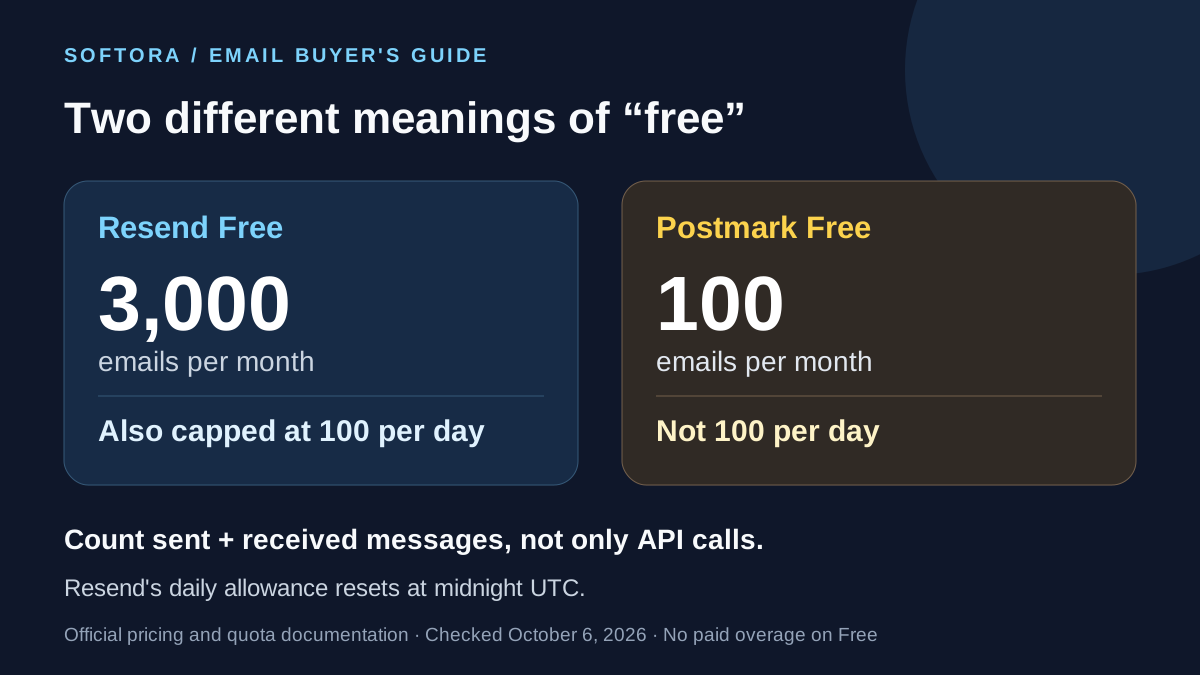
Resend Free allows 3,000 monthly emails with a separate 100-per-day limit. Postmark Free allows 100 per month. Both count inbound messages and additional recipients toward usage.
Resend Pro has $20/50,000 and $35/100,000 monthly options. Postmark Basic starts at $15/10,000; compare volume allocations and feature tiers rather than extrapolating one starting price.
Resend documents 30-day email-data retention on its self-serve plans. Postmark defaults to 45 days, with paid custom retention available on Pro and above.
Postmark Basic excludes inbound processing even though its Free plan includes it for evaluation. A team that needs application-managed replies should compare paid Pro, not just Basic.
This is documentary research checked October 6, 2026, not a delivery benchmark. Mail-server acceptance is not proof of inbox placement, and switching providers does not remove retry or authentication responsibilities.
Quick Verdict: Choose the Email Workflow, Not the Logo
Resend is the stronger starting point when a small SaaS team wants a larger free allowance, a React-friendly development workflow, and the lower documented sending bill at 50,000 or 100,000 monthly emails. Postmark deserves a closer look when 45-day message history, explicit separation of transactional and broadcast traffic, or its server-and-template workflow matter more. Neither is a universal deliverability winner: the receiving mailbox still controls inbox placement, and your domain, recipients, content, and sending habits remain part of the result.
This comparison concerns application email: password resets, account invitations, receipts, and notifications triggered by a product. It is not a ranking of newsletter editors. If your main job is building subscriber campaigns without engineering help, start with our email marketing platforms guide. If you are connecting an application's communication layer to the rest of the company, use the startup tech stack guide alongside this decision.
Research method: official pricing pages, product documentation, and support articles were checked on October 6, 2026. Sources sit beside the claims they support. Prices below are USD monthly self-serve figures, before taxes and optional services. The cost scenarios and migration checklist are editorial analysis, not observed customer results. No hands-on inbox-placement test, support-response benchmark, or production migration was performed. The cover is an illustrative coding photograph, not a screenshot of either email product.
Free Plans: 100 per Day Is Not 100 per Month
Resend's quota documentation gives Free accounts 3,000 transactional emails per month, subject to a separate 100-email daily cap. Both sent and received emails count, and additional To, CC, and BCC recipients consume separate units. The daily counter resets at midnight UTC; it is not a rolling 24-hour window. Three verified domains and 30-day email-data retention are included. A successful test with one recipient tells you nothing about whether a launch-day burst fits those limits.
An illustrative 30-day month with 60 outbound emails each day uses 1,800 emails and fits Resend Free if there is no additional inbound traffic. The same 1,800-email month containing a 200-email launch day does not fit the daily allowance. Spreading expired verification messages across later days is not a useful workaround; budget for a paid plan or change the workflow before launch. This is the kind of operational limit to record when assembling a free small-business software stack, rather than treating a monthly headline as unlimited capacity.
Postmark Free includes 100 emails per month, not per day, with no paid overage on that tier and no expiry date for the free plan itself. It is principally an integration-testing allowance. Its account approval process also matters: before approval, sending is restricted to verified domains and the documented test sink. Do not schedule a customer launch on the assumption that signing up or adding billing details removes every sending restriction. Free-plan features also do not map perfectly to Basic; inbound email is a notable example discussed below.
| Limit or feature | Resend Free | Postmark Free |
|---|---|---|
| Monthly email allowance | 3,000 sent and received emails | 100 sent and received emails |
| Daily allowance | 100; resets at midnight UTC | No separate daily cap; the 100/month cap still applies |
| Paid overage on Free | Not available | Not available |
| Verified sending domains | 3 | 10 |
| Default email-data retention | 30 days | 45 days |
| Inbound email processing | Included; consumes quota | Included for evaluation; excluded from paid Basic |
Paid Plans: Sending Volume and Features Are Separate Decisions
Resend's current pricing lists Pro at $20 for 50,000 monthly emails or $35 for 100,000. Both options have a $0.90-per-1,000 overage rate. Scale starts at $90 for 100,000, but it is not the only way to buy that volume: it also raises domain and webhook allowances and adds a dedicated Slack support channel. Pro includes 10 domains and five webhook endpoints; Scale includes 1,000 domains and ten endpoints. Compare the features you need before interpreting the $35 and $90 figures as conflicting prices.
At 10,000 monthly emails, Postmark's pricing calculator shows Basic at $15, Pro at $16.50, and Platform at $18. Their overage rates are $1.80, $1.30, and $1.20 per 1,000 respectively. Basic includes five sending domains and 45-day history but not inbound email processing. Pro includes ten domains, inbound processing, and access to paid custom retention; Platform includes unlimited sending domains. These are feature tiers with selectable volume allowances, not three fixed email quantities.
Both vendors publish monthly self-serve billing rather than an annual discount to apply to these prices. Resend handles Enterprise commitments separately. For a buyer, the practical rule is to write down the volume tier, feature tier, and optional services as separate lines in the budget. That makes the comparison useful inside a SaaS evaluation checklist and avoids the subscription mistakes covered in our SaaS spending guide. More expensive is not automatically more suitable, and cheaper sending is not the same as a cheaper support operation.
Pricing at 10,000, 50,000, and 100,000 Emails
The comparison table uses one recipient per outbound email, no inbound traffic, no marketing-contact subscription, and no add-ons. Resend figures use Pro; Postmark figures use Basic, so this is a sending-budget comparison rather than feature parity. The Resend pricing reference and Postmark volume selector are the sources. Postmark's displayed Basic volume steps include 10,000 for $15, 50,000 for $55, and 125,000 for $115. For a 100,000-email workload, that last option buys 25,000 emails of unused headroom.
At 100,000 emails, staying on Resend's 50,000-email Pro allocation would cost $20 plus 50 times $0.90, or $65. Selecting the 100,000-email Pro allocation costs $35 instead. At 125,000, that $35 option plus 25 times $0.90 produces $57.50. Scale at the same 100,000 allocation would start at $90 before those overages, but buys a different feature package. The lesson is not to extrapolate the cheapest plan forever: compare the next volume tier before accepting a recurring overage bill.
Postmark has a similar budgeting trap. At 100,000 emails, Basic's 50,000 allocation plus 50 times $1.80 would cost $145, whereas the displayed 125,000 allocation costs $115. These are calculated examples of available choices, not a promise that the vendor automatically moves you to the cheapest one. Add any required Pro features, retention extension, or extra operational services before deciding. Keeping an email-service line separate from compute and database charges also makes your hosting budget easier to audit.
| Monthly outbound emails | Resend Pro option | Postmark Basic option |
|---|---|---|
| 10,000 | $20; 50,000-email allocation | $15; 10,000-email allocation |
| 50,000 | $20; 50,000-email allocation | $55; 50,000-email allocation |
| 100,000 | $35; 100,000-email allocation | $115; 125,000-email allocation |
| 125,000 | $57.50; $35 plus $22.50 overage | $115; 125,000-email allocation |
Overages and Rate Limits: Why the Starting Price Can Mislead
At 25,000 emails on Postmark's 10,000-email allocation, Basic costs $15 plus $27 in overages, or $42. Pro costs $16.50 plus $19.50, or $36. Platform costs $18 plus $18, also $36. A higher feature tier can therefore cost less at a particular workload even before its features matter. Postmark's billing guide confirms that paid overages continue automatically, unused allowance does not roll over, and upgrades and downgrades have different billing timing. Recalculate for your normal month and your busiest one.
No daily quota does not mean unlimited instantaneous sending. Resend documents a default limit of ten API requests per second per team, shared across that team's API keys, with no separate burst allowance. A batch can contain up to 100 emails, but those messages still count toward the email quota. Its paid overage policy also describes a default cap of five times the monthly quota; confirm the applicable ceiling with support before planning an exceptional spike. A budget alert and a sending stop are different controls, so your application should monitor both.
Postmark documents batches of up to 500 messages in its sending API guide. That is a batch-size limit, not evidence of faster delivery or unrestricted throughput. On either service, pace work, handle transient errors, and account for each result in a batch rather than resending every recipient when only one fails. When n8n or Make triggers notifications, remember that a workflow retry can repeat an email send too. The automation platform comparison is useful for the upstream workflow, but it does not replace downstream delivery safeguards.
Developer Fit: React Email, Templates, SMTP, and Inbound Replies
Resend's Next.js guide demonstrates sending with the Node SDK and React Email components. That is a convenient fit when developers already review templates alongside application changes. Postmark's API guide documents TypeScript sending with hosted template aliases and variables, as well as raw HTML and text. Both services support an API and SMTP; neither requires your frontend to use a particular framework. Test template ownership, previewing, localization, and release coordination instead of choosing solely because a tutorial uses your stack.
Put provider credentials on the server, restrict who can trigger sends, and retain a durable record of the notification job. A form endpoint that accepts arbitrary recipients is an abuse risk, not a complete production integration. Likewise, firing an untracked promise and returning from a request is not a reliable queue. The Node.js hosting guide and Vercel vs Netlify comparison help separate the hosting decision from the application's responsibility for jobs, retries, and webhook processing.
Inbound email is a separate buying question. Resend lists inbound support across its plans. Postmark includes inbound on Free for evaluation but gates it to Pro or Platform on paid plans; Basic is therefore not a like-for-like replacement if customers reply into your application. Both count processed inbound messages toward usage. Receiving a message as structured data does not create a staffed support inbox by itself. If the requirement is assignments, agent notes, and conversation ownership, compare dedicated tools such as Help Scout and Chatwoot rather than silently budgeting for a custom help desk.
Deliverability: Accepted, Delivered, and in the Inbox Are Different
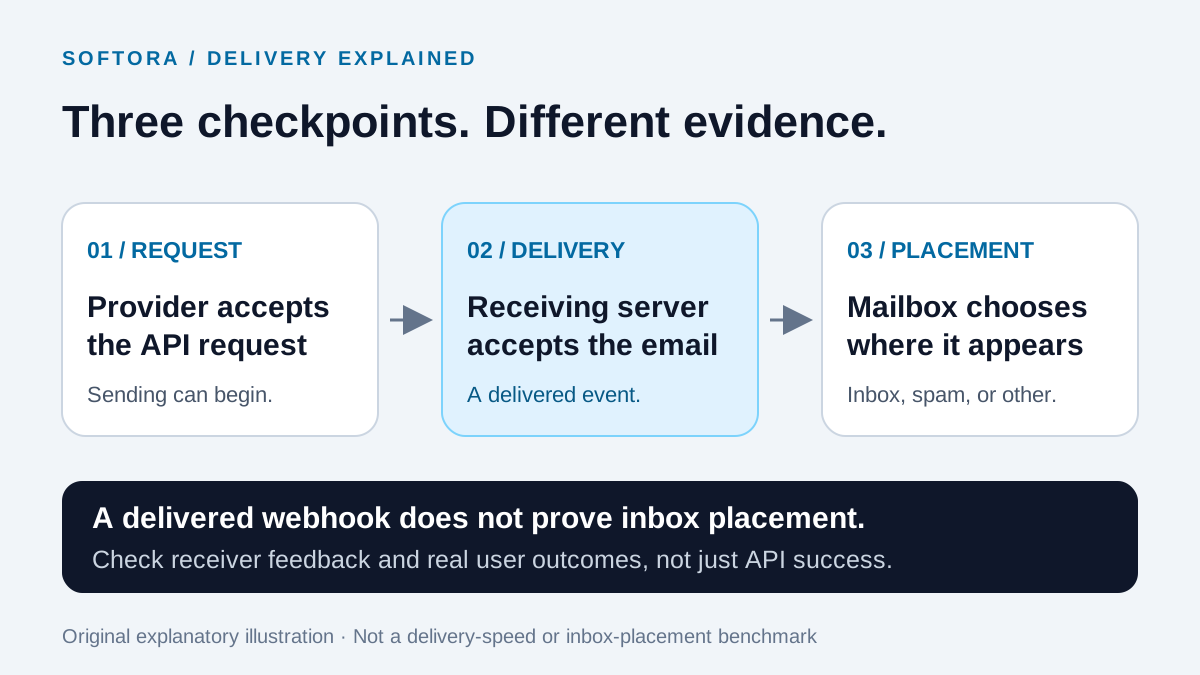
There are at least three checkpoints: your application hands a request to the provider; the provider receives acceptance from the destination mail server; the mailbox decides where to place the message. Resend's event reference distinguishes email.sent from email.delivered. Postmark's delivery-webhook documentation explicitly says that delivery means the receiving server accepted the message, not that it reached the inbox. A successful API response, an uptime SLA, and an inbox-placement measurement answer different questions.
For a useful pilot, send the same legitimate message types to a consented test group representing your recipient mix. Record application-event time, provider acceptance, destination-server acceptance, bounces, and the mailbox observations testers report. Separate Gmail, Microsoft, and business-domain results, and check whether password resets arrive before the application's token expires. These are proposed test criteria, not results from a Softora benchmark. Open tracking should not be the sole success metric: Google's sender guidance notes that low open rates are not necessarily reliable evidence of delivery problems.
Google requires SPF or DKIM for all senders to personal Gmail accounts, and SPF, DKIM, and DMARC for bulk senders; it recommends configuring all three. Follow the full requirements for your traffic, including authentication alignment and appropriate unsubscribe handling for marketing. Do not purchase lists or mix promotions into essential account messages and expect a provider change to repair the resulting reputation. Use the workflow discipline in our email marketing guide, but validate authentication and receiver feedback directly rather than treating any product ranking as an inbox guarantee.
Transactional vs Marketing Email: Keep the Boundaries Clear
Postmark is not transactional-only. Its Message Streams documentation describes separate sending infrastructure for transactional and broadcast traffic. Your application selects the appropriate stream; broadcast messages count toward the same subscription allowance as transactional and inbound messages. However, delivery infrastructure is not automatically a campaign platform with list imports, a marketer-friendly editor, and campaign reporting. If that is the job, use the Mailchimp alternatives guide to compare the right category instead.
Resend sells transactional usage and marketing contacts on different pricing schedules. A large marketing contact allowance does not erase the API's transactional quota. Its pricing also lists AI credits and automation runs separately, so distinguish creative assistance, workflow execution, and delivered email volume when requesting a quote. Start with the official plan definitions, not a screenshot combining every product's free allowance into one number.
A practical ownership split is simple: the application owns receipts and account notifications, while marketing owns consented promotional campaigns. Someone must still own consent records, sender identity, and suppression synchronization across both. The tools in our form-builder comparison can collect an opt-in, but that record must reach the system enforcing it. A second provider should not become a way to email someone who unsubscribed from the relevant campaign.
Retention and Support: Investigating a Missing Email
Consider a customer asking about a receipt sent 35 days ago. Resend documents 30-day retention for email content, metadata, delivery events, logs, and metrics on Free, Pro, and Scale; Enterprise can negotiate flexible retention. Postmark keeps full message content and activity for 45 days by default. In that example, the investigation falls outside Resend's default window but inside Postmark's. At 60 days, neither default is sufficient. This difference can matter more than a small sending-price saving to the team operating your SaaS help desk.
Postmark's retention documentation allows selected periods from seven to 365 days; current pricing restricts the add-on to Pro and above and starts at $5/month, with the actual price depending on volume and duration. Changes apply to future messages, not expired history. Aggregate statistics are retained separately and are not a substitute for an old message body. Its sending API documentation also warns that outbound attachments are not retrievable from its UI, API, or webhooks. Do not treat either dashboard as a permanent document archive.
Store the minimum event metadata your support and audit process actually needs, with an explicit retention policy and restricted access. Avoid logging live reset tokens or full sensitive email bodies by default. For escalation, compare the support entitlement you are buying: Resend lists ticket support and a dedicated Slack channel on Scale, while Postmark publishes a support center and contact route. Ask both vendors about coverage, escalation, and contractual response commitments; this guide did not measure response times. Connect useful delivery evidence to your customer-support workflow without exposing every customer's email content to every agent.
Webhooks and Retries: Prevent Duplicate Work, Not Just Errors
An ambiguous timeout is dangerous: the provider may have accepted an email even though your application never received the response. Resend's idempotency keys let you repeat the same supported sending request with the same key for 24 hours without sending it again. Reusing the key with different content produces a conflict rather than a fresh send. This is a useful retry boundary, not a permanent record of every business notification and not a key shared with Postmark or another provider.
Persist a business-event identifier and the provider message identifier in your own send ledger. Use an atomic claim or unique constraint so two workers cannot independently send the same notification. If the original outcome is uncertain, reconcile it before switching providers; blindly failing over after a timeout can deliver two receipts. For recurring events, identify the specific occurrence, not merely the customer. These are application-design safeguards, and they remain necessary whether the triggering workflow lives in custom code or the tools in our no-code automation guide.
Webhook authentication also differs. Resend documents signature verification against the raw request body. Postmark's webhook overview currently recommends HTTP Basic authentication over HTTPS plus IP allowlisting rather than HMAC signatures. Validate the payload, durably accept it before acknowledging success, and deduplicate at the event level. A message can produce several event types and several recipient events, so message ID alone is not a safe deduplication key for the whole lifecycle. Use the provider's stable event identifier where available, or a carefully defined compound key, and preserve meaningful later events.
A Safe Migration Checklist for a Small SaaS Team
First, inventory the actual emails: trigger, sender, template, recipients, reply destination, sensitivity, and acceptable delay. Include background jobs, billing callbacks, administrative actions, and retry paths rather than searching only for the primary send function. The complete SaaS stack guide helps identify the other systems that trigger notifications. Record which system owns each event so a billing platform and your application do not both send the same receipt.
Second, prepare domains and account approval before routing customer traffic. Validate DNS authentication, templates, plain-text alternatives, and reply behavior with addresses you control. Preserve valid suppressions and unsubscribe preferences with their scope; importing a list of previously bounced or opted-out recipients as fresh recipients is not a clean migration. Test the support lookup and retention policy too, including how agents will find messages sent before the cutover. Do not overwrite existing mailbox-routing records casually when configuring inbound email.
Third, route a small, clearly defined slice of legitimate traffic to the new provider, with exactly one sending owner per event. Keep old-provider webhooks active for late events and record the provider beside every message ID. Exercise a timeout, a temporary API rejection, a bounce, and a webhook retry using documented testing mechanisms rather than fabricated customer addresses. Pause the rollout if errors grow, and reconcile in-flight jobs before rolling back. The hosting and DevOps category helps with the underlying infrastructure, but the migration's acceptance criteria should be written against email behavior.
Finally, retire the old integration only after queued messages, event collection, and operational access have a defined end state. Confirm final overage charges and retain only the historical evidence your policy requires. A provider swap is complete when both engineering and support can operate the new path, not when a test email reaches the developer's inbox. Track email-related tickets and successful user actions alongside provider events; our analytics alternatives guide covers measurement choices without confusing dashboard activity with a completed customer workflow.
When Neither Provider Is the Right Choice
A team needing newsletter layouts, segmentation, and campaign scheduling without custom development should compare a marketing platform such as Brevo or MailerLite first. A hosted store may already have an adequate notification path; replacing it with a custom API can add maintenance without solving a customer problem. Use our ecommerce software guide to decide whether transactional delivery is actually the missing layer rather than buying infrastructure because it is fashionable.
Likewise, if your procurement requirement is a particular data-storage location, self-hosting, or a specific contractual control, request evidence for that exact requirement. Multi-region sending does not by itself establish where all customer data is stored, and a security badge does not complete your compliance assessment. Dedicated IPs are optional products with eligibility and operational trade-offs, not automatic fixes for a small sender. Write those requirements into the software evaluation framework before comparing a shared-infrastructure starter price with an enterprise quote.
Final Decision: Buy Against Your Acceptance Criteria
Choose Resend provisionally if your traffic fits its free daily ceiling or you want its documented Pro economics at 50,000 to 100,000 emails, with a development workflow your team can maintain. Choose Postmark provisionally if 45-day default history, its operational organization, or explicit transactional/broadcast separation justify its price for your workload. If replies must enter the application, compare Postmark Pro rather than Basic. If a feature is decisive, include it in the bill; if delivery is decisive, measure your own message types and recipient mix before declaring a winner.
The next step is a small evaluation with written pass/fail criteria: domain authentication, burst capacity, predictable costs, duplicate-resistant retries, useful delivery evidence, and a support process that works after the developer closes the laptop. Recheck the linked pricing and quota documents when you buy, since this comparison is dated October 6, 2026. Keep the decision connected to your email software shortlist and operating budget, rather than treating either brand as a guarantee that every notification will reach every inbox.
Buyer checklist before you choose
Common mistakes to avoid
Helpful Softora links
Frequently asked questions
Is Resend or Postmark better for a small SaaS application?
Resend is a useful first shortlist when the larger free allowance, React-friendly workflow, or documented Pro sending prices fit the application. Postmark is worth evaluating when 45-day default message history, explicit transactional/broadcast separation, or its operational workflow is more valuable. Compare paid Postmark Pro if you need inbound processing. These are fit-based conclusions from documentation, not results of a hands-on deliverability test.
What is the difference between Resend and Postmark free tiers?
Resend Free includes 3,000 emails per month with a separate 100-per-day cap that resets at midnight UTC. Postmark Free includes 100 emails per month and does not expire, but it is mainly an integration-testing allowance. Both count sent and received emails, and multiple recipients consume additional units. Neither free tier permits paid overages without an upgrade. Sending approval and domain verification still apply.
How much do Resend and Postmark cost at 100,000 emails per month?
For the outbound-only scenario in this guide, Resend Pro's 100,000-email allocation is $35 per month. Postmark Basic's displayed 125,000-email allocation is $115 and covers that workload with unused headroom. Resend Scale at $90 is a different feature tier, not the only way to send 100,000 emails. These October 6, 2026 figures exclude taxes, inbound traffic, marketing subscriptions, and add-ons; compare required features before treating them as equivalent packages.
Can Postmark send marketing emails as well as transactional emails?
Yes. Postmark supports broadcast sending through Message Streams that use separate infrastructure from transactional traffic. Broadcast messages consume the subscription's email allowance. That does not turn Postmark into a full newsletter platform: your application still needs the appropriate audience, campaign, and consent workflow. Resend also offers marketing email, with contact-based pricing separate from transactional usage.
Does a delivered webhook mean the email reached the inbox?
No. Both providers describe delivery events in terms of acceptance by the recipient's mail server. Inbox placement, spam filtering, forwarding, and other mailbox behavior occur beyond that checkpoint. Evaluate delivery evidence alongside consented mailbox observations and successful user actions; an API response or open rate alone is not a reliable inbox-placement benchmark.
How long do Resend and Postmark keep email logs?
Resend documents 30-day retention for email data on Free, Pro, and Scale, with flexible Enterprise options. Postmark defaults to 45 days of message content and activity; Pro and Platform can use a paid retention add-on with selected periods from seven to 365 days. Pricing depends on volume and duration. Postmark retention changes apply to future messages, not expired history, and aggregate statistics are different from retained message bodies.
Can I switch providers automatically when an email request times out?
Not safely without reconciling whether the first provider accepted the message. Resend documents a 24-hour idempotency window for supported sending requests retried with the same key and payload, but that key is not shared with another provider. Keep your own durable business-event and send records. A blind fallback after an ambiguous timeout can produce duplicate receipts or account notifications even if both providers work correctly.
Get practical software advice every week.
Join Softora readers who get SaaS buying guides, pricing changes, and comparison notes without the marketing noise.


