
Zoho Invoice vs Wave (2026): Free Plans, Fees & Limits
Compare Zoho Invoice and Wave on free-plan limits, payment fees, country and currency restrictions, recurring invoices, bookkeeping, and export requirements.
Key takeaways
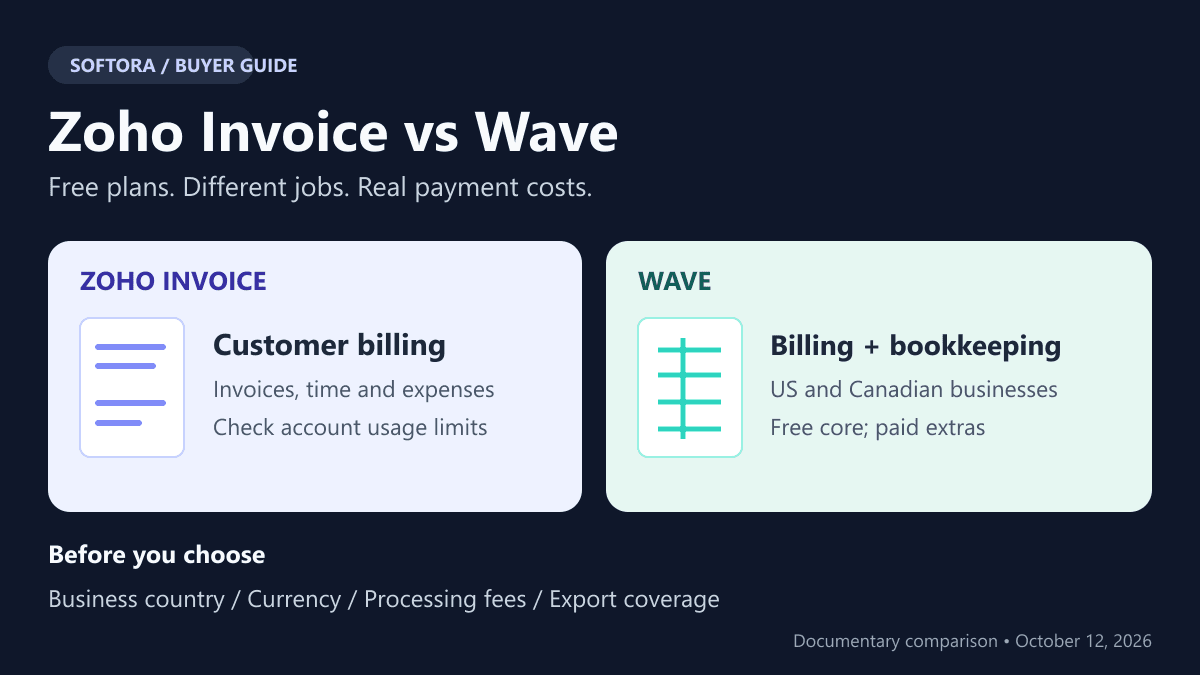
Zoho Invoice is a billing-focused product with expenses and timesheets, not Zoho Books. Wave Starter includes invoicing and bookkeeping for supported US/Canadian businesses.
Zoho's current limits include two users, three projects, and base-currency-only invoicing. Its pricing and dedicated invoice-quota guidance disagree; check the organization's Usage Stats.
Wave Pro is US$19/month or US$190/year per business; Canadian pricing is C$25/month or C$250/year. Bank imports, additional user access, and receipts can justify the paid plan.
Pro's card benefit removes only a $0.60 fixed fee on the first ten eligible monthly transactions, at most $6 in the US example. Percentage fees and subscription charges remain.
Recurring creation, delivery, automatic collection, and backup are separate workflows. Verify payment approval and export coverage before moving financial records.
Zoho Invoice vs Wave: The Short Answer
Choose Zoho Invoice for a focused customer-billing workflow if its user, project, currency, and account-specific invoice limits fit. Choose Wave when a supported US or Canadian business needs invoicing and bookkeeping together, then decide whether paid automation is necessary. Both have a continuing zero-subscription option, but neither makes payment processing free. The important comparison is the work each free plan covers, not a contest over which product displays the larger zero.
Zoho Invoice is not Zoho Books. Invoice handles quotes, invoices, expenses, time, and customer billing; Books is a separate accounting product. Wave includes bookkeeping records and reports in Starter. If you need supplier bills and broader accounting, comparing Zoho Books instead may be the correct next step. The Zoho Invoice review and accounting software directory provide context without treating every invoice editor as an interchangeable ledger.
Methodology: this is an AI-assisted documentary comparison of official pricing and help sources checked October 12, 2026, not hands-on financial testing. No account was opened, customer charged, invoice sent, or migration performed. Examples are calculated scenarios, not observed savings. US dollars are used where expressly stated; Canadian subscription prices are separate. Conflicting documentation and unverified account entitlements are identified rather than replaced with guessed limits. Product features do not guarantee tax compliance or suitability for your business.
Free Plans: Unlimited Creation Is Not Unlimited Functionality
The Zoho Invoice pricing page advertises free invoicing, recurring invoices, reminders, expenses, timesheets, and a customer portal. Dedicated guides specify two users per organization, three projects, and two organizations per account. An owner and accountant can exhaust the user allowance without any employees. Do not interpret the project limit as active-only or assume separate organizations pool capacity; those meanings were not established.
Invoice volume needs an account check. The pricing FAQ still references 500 invoices annually, while the dedicated invoice-limit FAQ directs readers to Settings → Usage Stats and says limits are updated annually. It specifies a reset based on the organization's creation date, not January 1. Treat this as conflicting guidance, not a universal 500-invoice promise or unlimited invoicing. For forty invoices monthly, budget 480 a year and confirm the actual allowance plus headroom before importing history.
Wave Starter explicitly allows unlimited estimates, invoices, bills, and bookkeeping records. That does not include every automation or delivery method. PDFs and links can be shared manually; sending through Wave and automatic late reminders have online-payments or Pro conditions. Automatic bank imports and digital receipt capture belong to paid offerings. Our free small-business software guide is a broader starting point, but current product-specific entitlements should determine the purchase.
| Requirement | Zoho Invoice | Wave Starter |
|---|---|---|
| Software subscription | $0; no paid Invoice tier ladder | $0; optional Pro and other paid services |
| Invoice volume | Check Settings → Usage Stats; pricing mentions 500/year but dedicated guidance is account-specific | Unlimited invoice creation advertised |
| Users and projects | Two organization users; up to three projects | Additional user access is a Pro feature; do not assume the same project/time tools |
| Purchase/accounting scope | Expenses, but no vendors, purchase orders, bills or vendor credits | Bills, bookkeeping records and financial reports included |
| Sending and reminders | Invoicing and automated reminders advertised | PDF/link sharing; sending through Wave and late reminders require online payments or Pro |
| Currency/region gate | Dedicated FAQ: base currency only; verify edition and gateway country | New supported businesses: US/Canada; payment currencies need a separate check |
| Online payments | Connected gateway sets its processing fees | Optional approved Wave payments with processing fees |
Country and Currency Can Decide Before Price
Wave's new-business guide restricts new supported businesses to the United States and Canada, excluding US territories. Having a US customer does not establish that an overseas business qualifies. Its outside-US/Canada notice treats existing overseas accounts separately: they may continue with limitations, but cannot send invoices or reminders through Wave and must share PDFs or links themselves. That legacy exception is not a new-account eligibility route.
Zoho's current multicurrency FAQ says Invoice can bill only in the organization's base currency and points to Zoho Billing for multiple currencies. This is a significant constraint for international freelancers; do not repeat older blanket claims that Invoice provides free multicurrency billing. Invoice language, customer location, document currency, and the gateway's charge/settlement currencies are different settings. Verify the edition and provider you would actually use instead of assuming an international software brand supports every local payment arrangement.
Wave's recurring-invoice guide permits choosing an invoice currency, but that alone does not establish what its merchant service can collect or settle. Neither a currency dropdown nor a payment-provider logo is approval for your business. If the requirements extend beyond these boundaries, use the freelancer invoicing shortlist or Invoice Ninja review to evaluate other workflows. Compare verified eligibility first; a plan you cannot use is not a low-cost alternative.
Wave Pro Pricing: What the Subscription Actually Buys
Current Wave pricing lists Pro at US$19 monthly or US$190 annually, and C$25 monthly or C$250 annually, plus applicable tax. It is charged per business, not once for every business an owner manages. The US annual option saves $38 against twelve $19 payments; approximately $15.83 per month is its annual equivalent, not a month-to-month offer. Two US businesses on annual Pro would commit $380 before extras, rather than sharing one $190 subscription.
Pro includes automatic bank imports, transaction merging/categorization, additional user access, and unlimited digital receipt capture. Starter's US receipt-scanning add-on is $8 monthly or $72 annually. A bank connection depends on support through Plaid; Wave does not guarantee every financial institution connects. Evaluate whether these specific tasks justify the subscription. The bookkeeper tools guide helps frame the handoff, but buying automation is not evidence that the resulting classifications or books are correct.
Zoho Invoice has no matching paid Invoice ladder to place beside Pro. If its two-user, project, currency, or billing limits are insufficient, Zoho Billing or Books are separate product decisions. Do not invent an Invoice Professional tier or imply that paying a little extra removes every cap. In the SaaS spending framework, an upgrade should buy a required workflow; the vendor's shared branding does not establish feature continuity after migration.
| Offer | Monthly billing | Annual billing | Scope |
|---|---|---|---|
| Starter | $0 | $0 | Core invoicing and bookkeeping; paid/conditional features remain separate |
| Pro — United States | US$19/month | US$190/year | Bank imports, receipt capture, additional access and other Pro features |
| Pro — Canada | C$25/month | C$250/year | Canadian subscription pricing, not a converted US quote |
| Starter receipt add-on — US | US$8/month | US$72/year | Digital receipt scanning; not the complete Pro bundle |
Payment Fees: Why Pro Does Not Pay for Itself on the Waiver Alone
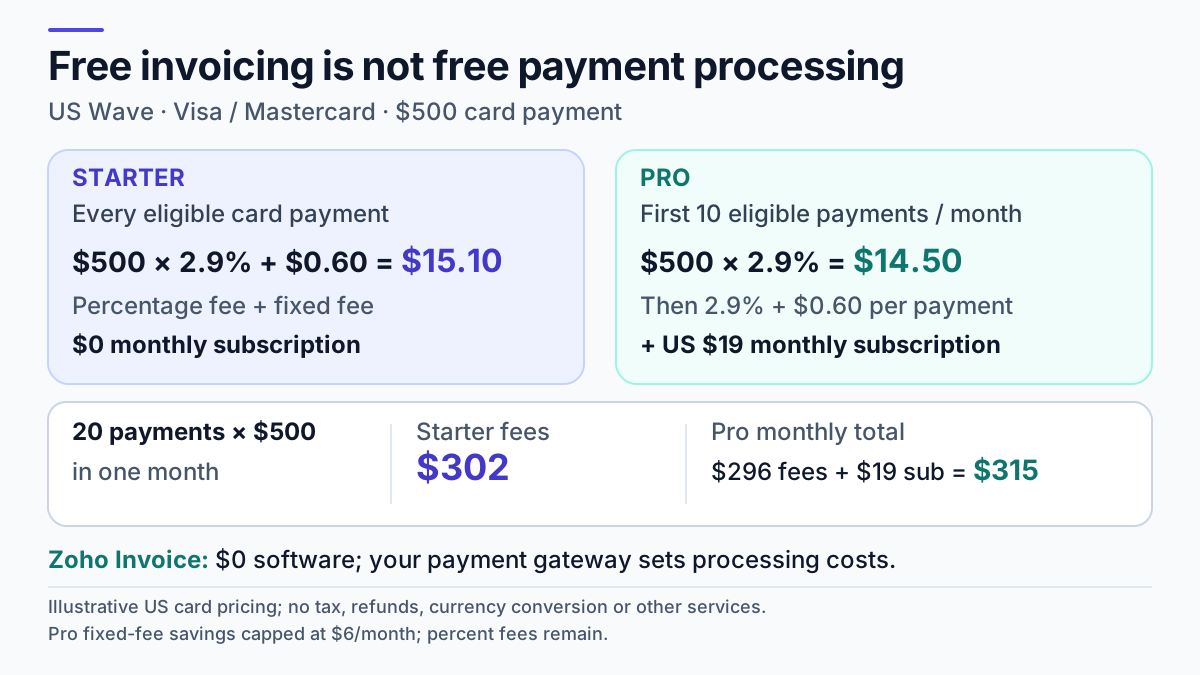
Wave's US pricing lists 2.9% plus $0.60 for ordinary supported card transactions and 3.4% plus $0.60 for Amex. Pro removes only the fixed $0.60 on the first ten cumulative eligible card transactions in each monthly subscription period. Percentage fees remain, and later card payments again incur the fixed fee. Discover is US-only. Approval for online payments is separate from purchasing Pro; do not treat a paid subscription as guaranteed merchant acceptance.
For twenty US$500 ordinary card payments, gross collections are $10,000. Starter processing is $290 in percentage fees plus $12 fixed fees: $302. Pro processing is $296 after the ten fixed-fee waivers; adding the $19 monthly subscription gives $315. The waiver saves at most $6 per eligible monthly period, so it cannot alone recover either the $19 monthly subscription or the approximately $15.83 annual equivalent. Pro may still be useful for bank feeds, access, or receipts. The table models fees, not a claim that both products offer identical accounting value.
Wave's payment-fee guide separately lists bank payments at 1% with a $1 minimum. Do not transfer US card examples into Canadian settlement or invent an unverified bank-fee cap. Payment methods also differ operationally. Check the actual merchant terms, refund/dispute rules, and settlement requirements before offering a method to clients; this comparison did not test any collection or payout.
Zoho's online-payment guide says Zoho does not charge for receiving online payments, while the connected gateway can charge its own fees. There is no single verified Zoho Invoice processing rate to put in the Wave calculation. Obtain the rate for your country, provider, method, and currency. Our software evaluation checklist can record those assumptions; a zero software subscription is only one line in the cost of getting paid.
| Payments / gross collected | Starter fees | Pro processing | Pro + US$19 subscription |
|---|---|---|---|
| 5 / $2,500 | $75.50 | $72.50 | $91.50 |
| 10 / $5,000 | $151.00 | $145.00 | $164.00 |
| 20 / $10,000 | $302.00 | $296.00 | $315.00 |
Recurring Invoices, Sending and Autocharging Are Three Operations
A recurring invoice creates another document on a schedule. Automatic sending delivers that document. Autocharging attempts collection through an authorized payment method. Enabling the first does not prove the other two happen. Zoho's recurring-invoice documentation describes scheduled generation and a separate Auto-charge feature. Gateway configuration and the customer's permitted payment arrangement still need confirmation; do not promise automatic collection merely because recurring billing appears on the free feature list.
Wave's recurring-invoice guide says businesses accepting Wave online payments or subscribing to Pro can email invoices through Wave, including automatic delivery. That means Pro is not the only documented route for sending. Automatic payment collection additionally depends on online payments and authorization; Pro alone does not supply that approval. Current public evidence did not fully resolve every Starter autocharge entitlement or historical grandfathering rule, so those should be checked in the actual account rather than generalized.
For a monthly service retainer, verify the generated date, delivery route, saved payment authorization, failure notice, and the behavior after cancellation. Avoid simultaneous source and destination schedules when migrating. The consultant software guide and automation tools category help organize these dependencies, but an integration is not permission to charge a client. Any test involving a real payment requires the customer's authorization and the provider's supported procedure.
Accounting, Time Tracking and the Accountant's Handoff
Zoho's purchase-module FAQ excludes vendors, purchase orders, bills, and vendor credits from Invoice. Its expense feature records costs without becoming that purchasing system. Wave Starter includes bookkeeping records, bills, and financial reports, so it addresses a broader accounting task. If a supplier ledger and regular reconciliation are mandatory, the decision is not settled by which invoice template looks better. Compare Wave's review context and the QuickBooks alternatives guide against the accountant's actual requirements.
For hourly services, Zoho's timesheet workflow connects projects and time to billing, within the three-project limit. A freelancer managing many simultaneous jobs should check that cap before committing. Do not assume Wave includes the same project timer; confirm the time-tracking and reconciliation workflow separately. An existing tool such as Harvest may provide the time record, but its cost and the work of moving approved hours must stay in the comparison.
Ask the accountant for a sample deliverable: an invoice, its payment, any credit adjustment, the expense evidence, and a report they actually use. Use a synthetic example, not a client's sensitive ledger uploaded casually to a trial or AI system. The accounting buyer's guide is a wider shortlist when required controls outgrow a billing-focused product. Neither a connected bank feed nor an automatically categorized transaction removes the need for review.
Exports and Backups: Keep Documents Separate from Data
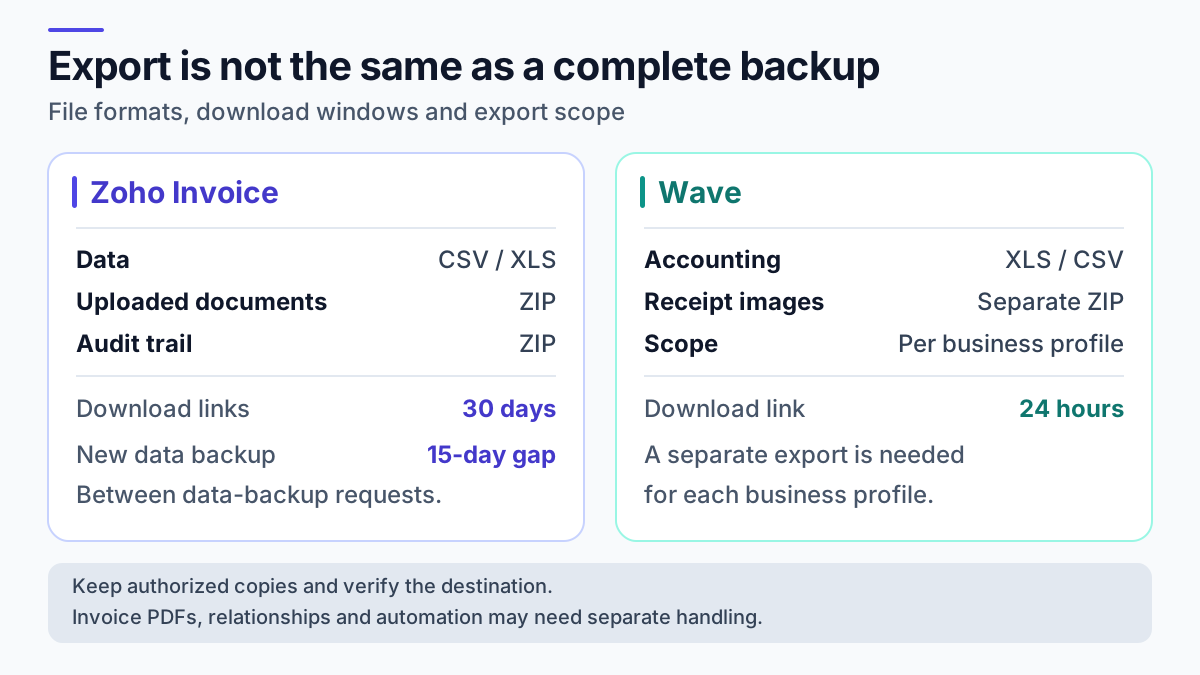
Zoho's backup documentation separates transaction data in CSV/XLS from uploaded documents and audit-trail records in ZIP archives. An admin requests the backup; generation may take up to thirty minutes, links expire after thirty days, and another data backup cannot be initiated for fifteen days. Plan that interval before using a preliminary export near a cutover. Uploaded documents are not necessarily a collection of every generated invoice PDF, and export availability is not proof of one-click restoration.
Wave's account-data export guide describes exports per business profile: accounting files cover transactions/journal entries, bills, customers, and vendors, while uploaded receipt images have a separate ZIP. The emailed links expire after twenty-four hours. The guide does not establish that every invoice PDF, estimate attachment, or app-held record is included. Request the relevant output for every business rather than assuming one account download covers all profiles.
Reconcile a sample before closing the source: identifiers, line items, taxes, payment allocations, open balances, documents, and recurring schedules. Some items may need a separate export or manual reconstruction. Store authorized archives somewhere controlled; an emailed download link is temporary access, not a retention policy. The freelancer operations guide provides wider workflow context. This article did not perform a migration, and neither vendor's export button proves that another product can rebuild every relationship.
Cancellation and Inactivity: Free Is Not Permanent Archiving
Zoho's inactivity FAQ says an organization continuously inactive for 180 days is scheduled for deletion, with reminders before associated data is removed. Its pricing page mentions an additional twenty-day window, but the dedicated policy does not specify that fixed timetable. Do not treat exactly 200 days as a guaranteed retention period. A seasonal freelancer should preserve independent records and ensure someone receives and acts on account notices.
Wave's subscription-cancellation guide says paid features remain until the current subscription period ends. Canceling Pro is different from deleting the business, terminating payment arrangements, or proving indefinite data retention. Export before changing a critical account and verify which automation stops. For another client-work suite such as Bonsai, check its own terms instead of transferring these rules across vendors.
Choose by the First Requirement That Would Fail
For a small service business needing customer invoices, reminders, project time, and a portal in one base currency, Zoho Invoice merits a shortlist if its account quota and two-user/three-project limits fit. For a supported US or Canadian microbusiness needing invoices and bookkeeping in one place, Wave Starter is a reasonable starting point; Pro should be justified by its actual paid workflows, not the small fixed-fee waiver. These are conditional recommendations rather than rankings based on hands-on speed or tax-accuracy tests.
Reject either option if business eligibility, currencies, collaboration, purchase accounting, or export requirements already fail. Before adopting, record the current quote, usage allowance, reset date, payment approval, and backup procedure. Then verify one authorized end-to-end billing scenario and the accountant's handoff. The best next step is a requirements-led evaluation, not buying the plan with the most features or assuming free software creates a risk-free financial process.
Buyer checklist before you choose
Common mistakes to avoid
Helpful Softora links
Frequently asked questions
Which is better for a freelancer: Zoho Invoice or Wave?
Zoho Invoice merits a shortlist for customer billing, project time and a portal when its user, project, currency and account quota fit. Wave suits a supported US/Canadian business needing invoicing plus bookkeeping. Neither is universally better; payment eligibility, automation and the accountant's required handoff can decide before price.
Does Zoho Invoice still include 500 invoices per year?
Its pricing FAQ mentions 500, but the current dedicated quota FAQ directs you to your organization's Settings → Usage Stats and says limits are updated annually. The reset follows the organization's creation date. Confirm the actual account allowance rather than treating 500 as universal or assuming unlimited invoicing.
Can I invoice in several currencies with free Zoho Invoice?
The current dedicated multicurrency FAQ says Zoho Invoice can use only the organization's base currency and directs multicurrency needs to Zoho Billing. Older guides may differ. Verify the intended edition, and check the gateway's charge and settlement currencies separately; an invoice currency is not payment-processing approval.
Can a business outside the US or Canada start using Wave?
Wave's current new-business guidance supports US and Canadian businesses only, excluding US territories. Existing overseas accounts are treated separately and have restrictions, including no invoice/reminder sending through Wave. Those users may share PDFs or links themselves, but that legacy exception does not establish eligibility for a new overseas business.
Are Wave recurring invoices and autopay both free?
Do not treat them as one entitlement. Recurring creation, email delivery and automatic collection are separate. Wave documents sending for online-payments-enabled businesses or Pro subscribers; autocharging also needs payment approval and authorization. Current public evidence did not settle every Starter or legacy exception, so verify the intended account before promising automatic collection.
Does Wave Pro eliminate card-payment fees?
No. In the US pricing example it removes only the $0.60 fixed component for the first ten eligible card transactions per monthly subscription period, at most $6. Percentage fees remain. Twenty $500 ordinary card payments illustrate $302 Starter fees versus $296 Pro processing plus $19 monthly subscription, or $315 before tax and extras.
What should I export before switching invoicing tools?
Preserve the needed transaction data, uploaded documents/receipts, customer records, open balances and relevant activity records. Zoho documents separate data, document and audit-trail backups; Wave separates accounting exports from receipt images per business. Verify generated PDFs and attachments separately and reconcile the destination. A download is not proof of a complete restore or migrated payment authorization.
Get practical software advice every week.
Join Softora readers who get SaaS buying guides, pricing changes, and comparison notes without the marketing noise.


