Softora
Home
Categories
CRM & SalesEmail MarketingProject ManagementAccounting & InvoicingCustomer SupportHR & PayrollSEO & AnalyticsWebsite BuildersAI ToolsNo-Code & AutomationTeam CommunicationHosting & DevOpsE-commerce Platforms
BlogBest SoftwareCompare ToolsResourcesContact
Home/Compare Tools/Sitebulb vs Screaming Frog
SEO & Analytics comparison

Sitebulb vs Screaming Frog (2026): Costs & Crawl Limits

Compare Sitebulb and Screaming Frog on free limits, real Desktop and Cloud costs, JavaScript crawling, audit coverage, client reporting, and reusable exports.

Updated October 14, 202616 min read
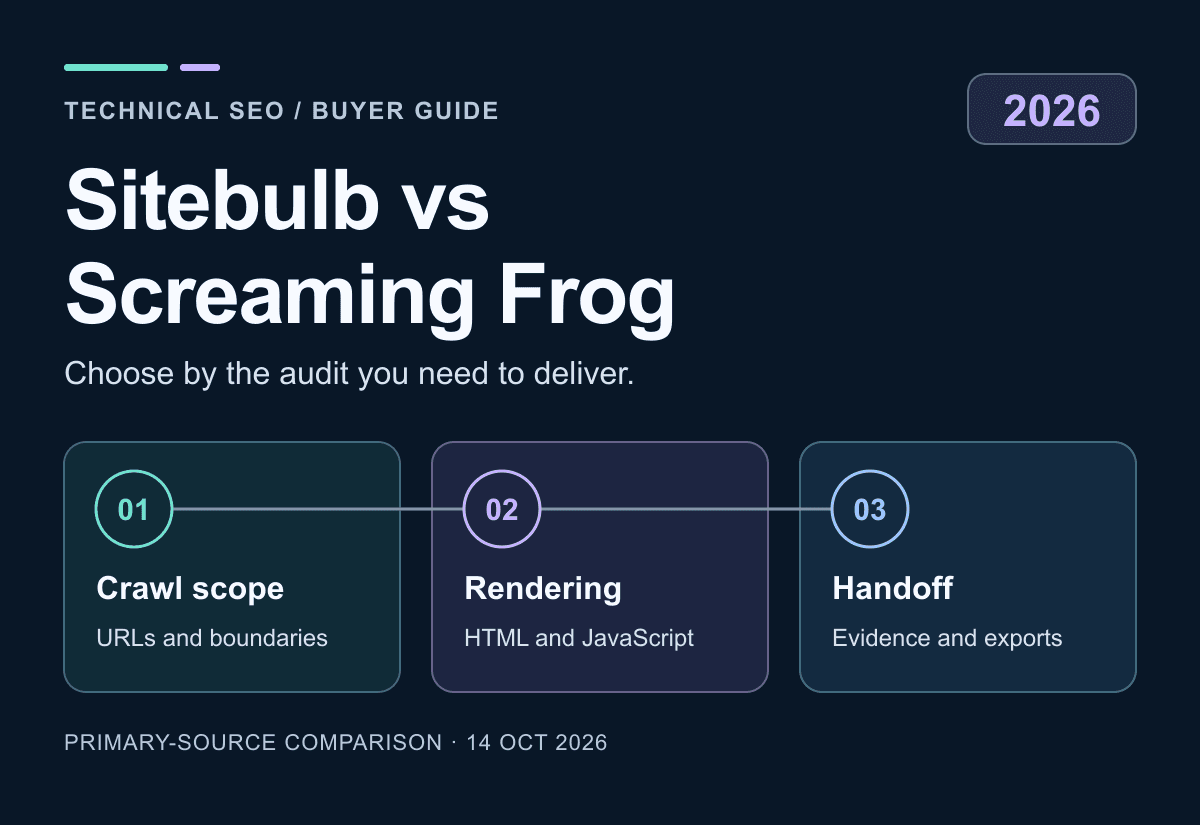
Original Sitebulb versus Screaming Frog illustration showing crawl scope, rendering and report handoff, not a product screenshot
SitebulbvsScreaming Frog

Key takeaways

1

Screaming Frog Free permits 500 URLs per crawl but excludes JavaScript and saved-crawl reopening. Sitebulb Lite includes JavaScript at 10,000 URLs per audit; it is paid, not permanently free.

2

Observed individual annual USD prices are Sitebulb Lite $180, Pro $425 and Screaming Frog $279. Compare the needed features and actual billing cycle, not a monthly-equivalent headline.

3

Sitebulb Cloud is a separate hosted package. Its current capacity table conflicts with an older FAQ example, so confirm the monthly workload and largest-audit allowance before purchase.

4

Crawl findings, client reports and reusable native audits are different outputs. Preserve configuration and evidence; neither crawler establishes Google indexing or guaranteed traffic.

Softora verdict

Sitebulb for guided audit delivery; Screaming Frog for a configurable desktop workflow

Choose Sitebulb provisionally when explanatory findings and, on Pro, customized client reports improve your audit process. Choose Screaming Frog when its extraction, configuration and desktop workflow fit the analyst. Free Screaming Frog excludes JavaScript rendering; Sitebulb Lite includes it but has its own feature limits. Compare Desktop with Desktop, then price hosted collaboration separately. Neither crawler proves Google indexing or guarantees rankings.

Guided audits; Desktop or managed Cloud

Sitebulb

Auditors who want explanatory Hints, visual investigation and a documented handoff; teams considering shared hosted audits can evaluate Cloud separately.

Observed USD calculator: Lite $18/month or $180/year for one user; Pro $42/month or $425/year for one user. Cloud Mini $125/month includes two users but no desktop licences. Confirm buyer-specific tax treatment.

Strengths

  • JavaScript crawling included in Lite
  • Pro audit comparisons, scheduling and customized PDFs
  • Managed Cloud with separately specified user and crawl allowances

Watch for

  • No continuing free plan; Desktop trial is temporary
  • Lite omits several specialist reports and scheduling
  • Cloud table and FAQ conflict on some capacity examples
Read full review

Configurable desktop SEO Spider

Screaming Frog

Analysts who need controllable crawl sources, extraction and spreadsheet-based investigation, and can manage the local or remotely hosted machine.

Free: up to 500 URLs per crawl with feature restrictions. Individual licence US$279/year; five licences bought together are $265 each. $23.25/month is an annual equivalent, not a monthly subscription.

Strengths

  • Ongoing free HTML-crawl option
  • Licensed rendering, extraction and API integrations
  • Windows, macOS and Linux desktop availability

Watch for

  • Free excludes saving/reopening and JavaScript rendering
  • Large crawls depend on memory, storage and configuration
  • A licence is not a managed shared-cloud service
Read full review

Decision table

Where each tool wins

Sitebulb vs Screaming Frog: feature boundaries and conditional recommendations
FactorSitebulbScreaming FrogWinner
Ongoing free accessNo continuing free plan; 14-day Desktop trial500 URLs per crawl; limited feature setScreaming Frog for a fitting free crawl
Entry JavaScript accessLite includes JavaScript crawlingPaid licence requiredSitebulb Lite has the lower verified annual entry cost
One-user annual base costLite $180; Pro $425Licensed Spider $279Match required features before price
Desktop crawl sizeLite 10,000/audit; Pro default 500,000, configurable up to 2 millionLicensed capacity depends on machine and settingsNo unmeasured scale or speed winner
Scheduling and comparisonPro and Cloud; not LitePaid; comparison requires database modeBoth, on the appropriate setup
Guided findingsExplanatory Hints and Pro customized PDF reportsIssues, filters, exports and configurable investigationTest the client's actual deliverable
Five-user hosted packageCloud Small: $245/month; five Pro desktop licences includedFive licences: $1,325/year; remote infrastructure extraNot equivalent hosting offers
Monthly Cloud capacitySmall table: 1 million/month, 250,000/audit; FAQ example differsNo equivalent managed-cloud quota bundled with desktop licenceObtain a workload-matched quote
Reusable audit archiveNative .sbp audit share file; separate reportsNative .seospider/.dbseospider; paid access to reopenKeep native evidence and portable reports
Actual Google indexingA crawler finding is not indexing proofA crawler finding is not indexing proofCheck Google's own evidence separately

Best-fit buyer profile

Which tool fits your team better?

The winner depends on workflow maturity, team size, budget, and how much structure your team can maintain after the trial ends.

Choose Sitebulb if...

Explanatory Hints help the auditor turn evidence into a prioritized client discussion.
Lite's included JavaScript and reports meet the task, or Pro's additional checks and PDFs justify its price.
Cloud's hosted scheduling and shared audit data solve a real team requirement.
The current quote, monthly capacity, largest audit and native-file access have been confirmed.

Choose Screaming Frog if...

A small HTML-only task fits the Free URL and feature boundaries.
The analyst needs licensed extraction, configurable discovery and saved-crawl investigation.
The team can own the required desktop or remote machine and storage configuration.
Portable reports are archived before a paid licence expires and saved-crawl access ends.

In this comparison

The Short Answer: Choose the Audit Workflow, Not a Speed ClaimFree Plans and JavaScript: The Upgrade Can Come Before URL 501Desktop Pricing: Compare Annual Bills with Annual BillsSitebulb Cloud: Price the Monthly Workload and Largest Audit SeparatelyCrawl Coverage: Discovered Links Are Not the Entire WebsiteJavaScript Rendering: Compare the Response with the Rendered PageHardware, Scheduling and Shared Access Change the Operating CostClient Reports and Native Audits Are Different DeliverablesPrivacy and Crawl Safety: Local Software Still Makes RequestsFinal Decision: Validate One Audit from Discovery to HandoffDecision checklistCommon mistakesMigration questions

The Short Answer: Choose the Audit Workflow, Not a Speed Claim

Sitebulb vs Screaming Frog is a choice about collecting, interpreting and handing off technical evidence. Sitebulb is worth shortlisting when its explanatory Hints and visual summaries help an auditor turn findings into a client-facing plan. Screaming Frog is worth shortlisting when the analyst wants a configurable desktop crawl and detailed extraction workflow. Both need someone to decide which findings matter. Neither automatically converts a long issue list into useful engineering work or higher rankings.

The Sitebulb review and Screaming Frog review provide product context. This comparison checks official pricing, licensing and documentation on October 14, 2026; it is not a hands-on crawl-speed, memory, accuracy or ranking benchmark. Prices are observed public USD offers, with billing units stated. A static brochure site, a JavaScript storefront and a multi-client agency impose different requirements. Start by naming the site, permitted crawl scope, required reports and people who need access.

Keep these crawlers separate from keyword databases and backlink research. The Ahrefs vs Semrush comparison addresses that different buying decision. For this purchase, the useful question is whether the selected crawler can collect the necessary evidence and deliver it in a form your team can act on, within the chosen plan and infrastructure budget.

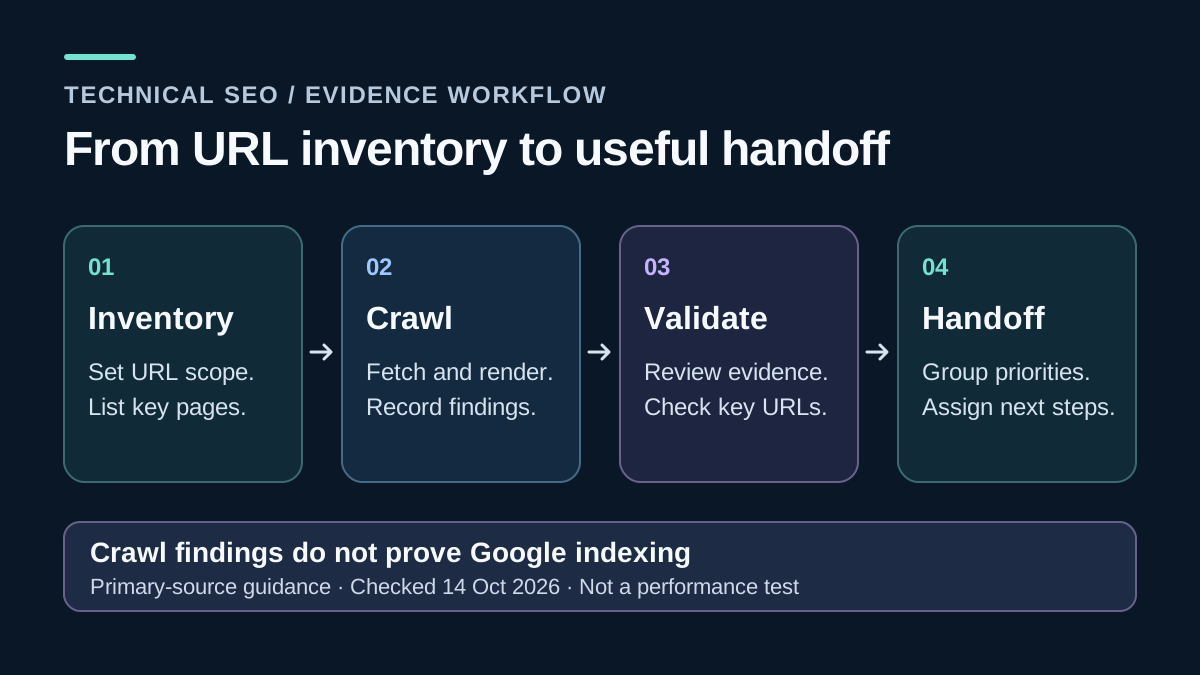
Original audit workflow diagram: inventory, crawl, validation and report handoff are separate stages
Proposed evaluation workflow, not a benchmark: reconcile the URL inventory, inspect findings and define the client's deliverable before choosing a crawler.

Free Plans and JavaScript: The Upgrade Can Come Before URL 501

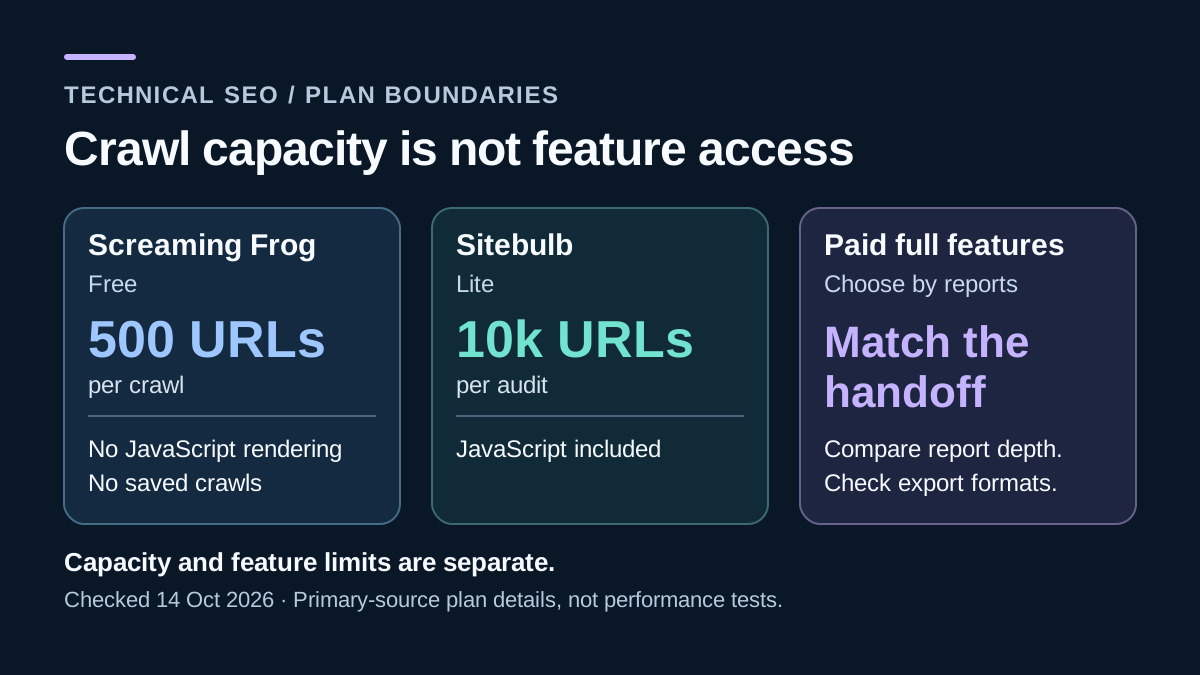
Screaming Frog pricing lists an ongoing Free edition limited to 500 URLs per crawl. Do not translate that into 500 complete HTML pages: a crawl can include resources and external URLs as well as pages. A site's advertised page count is therefore not enough to establish that the audit fits. Inspect the actual crawl and included resource types rather than assuming a small navigation menu means a small crawl.

The paid licence also unlocks capabilities, not just capacity. JavaScript rendering, saving and reopening crawls, GA/GSC/PageSpeed integrations, custom extraction, scheduling and crawl comparison are licensed features. A 100-page JavaScript application can need paid Screaming Frog before its URL count becomes a problem. The free SEO tools guide helps assemble a starting toolkit, but it cannot make a missing paid capability appear in a free edition.

Sitebulb Desktop pricing describes a 14-day Pro-equivalent trial without a card, not a permanent free plan. Lite includes JavaScript crawling, GA/GSC/Sheets integration and crawl maps, with 10,000 URLs per audit. Pro adds scheduling, audit comparisons, customized PDF reports and specialist report areas. In particular, Lite should not be bought on the assumption that Pro's structured-data, hreflang, performance or accessibility reports are included. Choose by the required checks as well as URL capacity.

Screaming Frog Free's 500-URL limit and Sitebulb Lite's 10,000-URL per-audit limit have different JavaScript entitlements
Documented limits checked October 14, 2026. Capacity and feature access are separate; a small JavaScript site can need paid Screaming Frog.

Desktop Pricing: Compare Annual Bills with Annual Bills

Sitebulb's public USD calculator returned Lite at $18 monthly or $180 annually, and one-user Pro at $42 monthly or $425 annually. Annual prices are upfront totals, not twelve payments of the lower equivalent. The annual page's own formatting selects $425 for Pro; a generic savings banner should not be used to recalculate a different invoice. Sitebulb's buyer-specific tax treatment was not established by the returned price values, so confirm it before payment.

Screaming Frog's current individual licence is US$279 for a year. Dividing that by twelve gives $23.25 as a budgeting equivalent, not an available month-to-month subscription. Against that licence, Sitebulb Lite's $180 annual base is $99 lower and Pro's $425 is $146 higher. That does not make Lite equivalent to either full-featured alternative. If scheduling or a Pro-only report is mandatory, Lite is not the suitable price to compare.

The Screaming Frog licensing FAQ requires a licence per person, while allowing reasonable multiple-device use by that person. Five licences purchased together cost $265 each, or $1,325 annually; do not apply the single-user price to a qualifying bulk purchase. Sitebulb has its own extra-user packages, so a five-user Pro quote should not be invented by multiplying its one-user price. Keep hardware, optional API services and analyst time outside the base subscription rows in your SaaS evaluation checklist.

Observed USD base prices checked October 14, 2026; taxes depend on buyer/checkout, and annual equivalents are not monthly installments
ConfigurationMonthly subscriptionAnnual paymentAnnual monthly equivalentIncluded users
Sitebulb Lite$18$180$151
Sitebulb Pro$42$425About $35.421
Screaming Frog licenceNot offered$279$23.251
Screaming Frog bulk purchaseNot offered$1,325 totalAbout $110.42 total5 ($265 each/year)

Sitebulb Cloud: Price the Monthly Workload and Largest Audit Separately

Sitebulb Cloud pricing is a hosted package, not a per-seat copy of Desktop. The observed USD quotes are Mini $125/month for two users, Small $245 for five, and Medium $495 for ten. Mini excludes desktop licences; Small and higher include corresponding Pro desktop access. Do not multiply Mini by its two included users or assume every Cloud plan includes Desktop because of a general marketing headline.

The current table lists Mini at 50,000 URLs per month and per audit; Small at one million monthly and 250,000 per audit; Medium at 2.5 million monthly and one million per audit. Unlimited projects does not mean unlimited crawling. Medium also lists concurrent crawling, while Mini and Small do not. No additional JavaScript charge is advertised, but monthly accounting details such as rollover, resets, failed crawls and overages were not fully established. Confirm them for the intended contract.

Consider ten client sites with 200,000 URLs each. One full pass is two million URLs; two passes are four million, before additional tests. Under the current table, the first workload exceeds Small but fits Medium's listed monthly and individual-audit limits. The second exceeds Medium. However, the same page's FAQ still puts two million on Small and four million on Medium. This official conflict is disclosed rather than resolved in favor of the larger allowance. Obtain confirmation before promising the schedule to clients; the agency software guide can help budget the surrounding work.

Current Sitebulb Cloud table and USD calculator; package prices include the stated users, and the FAQ's larger workload examples conflict
Package / usersMonthly / annual totalURLs per monthMax URLs per auditPro desktop licences
Mini / 2$125 / $1,50050,00050,000None
Small / 5$245 / $2,9401,000,000250,0005 included
Medium / 10$495 / $5,9402,500,0001,000,00010 included
Calculated workload examples using the current capacity table, not the conflicting FAQ; excludes extra crawls and assumes each site stays within its stated size
WorkloadMonthly URL totalLargest auditFit under current table
10 sites × 200,000 URLs × 1 pass2,000,000200,000Exceeds Small; fits Medium's listed capacity
10 sites × 200,000 URLs × 2 passes4,000,000200,000Exceeds Medium; obtain a larger quote
1 site × 600,000 URLs × 1 pass600,000600,000Small's monthly total fits, but its per-audit cap fails

Crawl Coverage: Discovered Links Are Not the Entire Website

A crawler sees the URLs it can discover and is configured to request. It cannot prove that an unlinked page does not exist. Sitebulb's audit settings and crawl setup guide describe website links, sitemaps, supplied URL lists and optional analytics/Search Console sources. Decide which sources to use before comparing findings. Connecting an account is not the same as enabling every discovery option.

Screaming Frog configuration likewise separates ordinary spidering from List mode and additional discovery settings. Its default List-mode depth zero checks the supplied list; that is useful for a migration URL inventory but is not a complete site crawl. Sitebulb's documented list workflow does not follow outgoing links and restricts URLs to the starting subdomain. These differences can change the result even when both tools receive a file with the same name.

For a proposed migration audit, reconcile the CMS URL inventory, XML sitemaps, crawl-discovered URLs and permitted analytics/search records. Include redirected, canonicalized, blocked and deliberately noindexed examples. Some missing URLs represent intentional exclusions rather than crawler defects. The website-builder guide and SEO category provide context, but the acceptance evidence is your inventory and documented exclusions. No complete-orphan-discovery claim is justified from one source-limited crawl.

JavaScript Rendering: Compare the Response with the Rendered Page

Sitebulb's crawler settings offer HTML and headless-Chrome approaches, response-versus-rendered comparison and single-page investigation. Licensed Screaming Frog can store original and rendered HTML for comparison. The useful question is what changes: links, titles, canonical tags, robots directives or main content. Test a representative route whose important content appears after JavaScript rather than selecting a winner because both marketing pages mention rendering.

Rendering is not identical to Google's indexing process. A crawl has its own viewport, waits, resource access and authentication state; Google may encounter different conditions. A rendered screenshot alone also does not prove that important links are crawlable anchors. Compare the source and rendered output, check failed resources and record the configuration. When reviewing a site built with Webflow or Framer, evaluate the actual published implementation instead of assuming the builder determines the result.

For a fair side-by-side evaluation, retain the software versions, crawl mode, user agent, URL scope, resource settings, concurrency, timeout and hardware. Run only on an authorized site with an agreed request rate. A fast run that skipped resources or used plain HTML should not be presented as beating a slower rendered crawl with broader scope. This comparison supplies that test design; it does not claim the test was performed.

Hardware, Scheduling and Shared Access Change the Operating Cost

Sitebulb's requirements specify supported Windows/macOS versions and usable memory, not merely installed RAM. Its Desktop pricing explains that Pro's 500,000-URL limit is a default that can be increased to two million, subject to the machine. That is not a promise that every laptop can finish that workload. URL complexity, stored data and JavaScript rendering can change resource needs substantially.

Screaming Frog's general guide and FAQ distinguish memory and database storage modes. For larger workloads, the FAQ recommends an SSD and sufficient RAM; its licensed unlimited label remains constrained by hardware and configuration. Crawl comparison needs database mode. Record free disk space and storage mode before an audit, and preserve configuration so a later run is genuinely comparable.

A scheduled desktop crawl still depends on its machine being available. Screaming Frog can run on a user-managed remote server, but the licence does not include its hosting, administration or team access management. Sitebulb Cloud supplies a different managed workflow. Five desktop licences at $1,325/year and Cloud Small at $2,940/year therefore have a $1,615 base-price difference, not a proven total-cost saving. Include infrastructure, maintenance and report coordination; the hosting category is relevant only if self-managed infrastructure is actually needed.

Client Reports and Native Audits Are Different Deliverables

Sitebulb Pro's customized PDF reports can support client communication, while its export settings distinguish spreadsheet outputs from an entire audit shared as a native .sbp file. A report is useful for communicating findings; the native audit supports further investigation in Sitebulb. Confirm the recipient's required entitlement before promising that every client can reopen it without a licence.

Screaming Frog's general guide similarly separates CSV/Excel/Sheets reports from portable native .seospider and .dbseospider files. A .dbseospider file requires database storage mode; .seospider supports either mode. A spreadsheet is not a replacement for the saved crawl, configuration and relationships needed to investigate later. Its licensing FAQ says saved crawls cannot be opened after paid access expires and the application reverts to Free. Keep accessible report exports as well as native evidence before a licence ends.

For either tool, deliver a prioritized issue, affected URL sample, expected behavior, observed evidence, responsible owner and retest condition. Do not send a raw count of warnings and call it an implementation plan. The digital marketing tools guide is a wider workflow reference. Native audit files do not establish cross-crawler portability, and no automatic Sitebulb-to-Screaming-Frog or reverse migration is assumed here.

Privacy and Crawl Safety: Local Software Still Makes Requests

Local crawl storage does not mean data never leaves the machine. The crawler requests the target website; rendered pages can request additional resources; optional API, cloud-export or AI integrations add other destinations. Screaming Frog's FAQ describes local crawl data alongside licence/debug handling and optional external AI processing. Treat client-only URLs, authentication cookies, exported reports and connected accounts as governed data, not harmless diagnostic leftovers.

Use the least access needed and check the mode's behavior rather than assuming robots handling is identical everywhere. Screaming Frog documents List mode as ignoring robots by default, which needs deliberate review for the task. Never use a crawler to bypass authorization. Exclude destructive or action-triggering URLs, agree rate limits, and avoid uploading confidential evidence to an unapproved assistant. An MCP or AI connection is not, by itself, organizational permission to share an audit.

Final Decision: Validate One Audit from Discovery to Handoff

Choose Screaming Frog Free for a fitting small HTML-only investigation when its capacity and missing paid features are acceptable. Choose Sitebulb Lite for a modest audit needing included JavaScript and its available reports. Compare Sitebulb Pro with licensed Screaming Frog when scheduling, saved evidence, specialist checks or client deliverables become required. Add Sitebulb Cloud only when its hosted scheduling and shared data solve a real problem, after resolving the capacity conflict.

Evaluate one authorized representative site from URL inventory through client handoff. Verify a known broken link, a redirect chain, a rendered route, an intentionally excluded page, a report export and a reopened saved audit. Measure performance only under matched settings if speed matters. The Ahrefs alternatives guide helps separate crawling from broader SEO subscriptions. The final selection should rest on this workflow evidence and a current quote, not a vendor's unsupported ranking or speed promise.

Decision checklist

Specify the authorized URL inventory, sitemap/list sources, excluded areas and Google integrations needed.
Match HTML versus JavaScript mode, resource handling, timeouts, concurrency and machine configuration.
Compare the relevant annual licence or monthly subscription at the real number of users.
For Cloud, check monthly URLs, maximum audit size, concurrent crawling and included desktop licences separately.
Validate one known issue and one intentional exclusion before trusting a bulk finding count.
Produce an actionable report, preserve the native audit and verify reopening/recipient entitlement.

Common mistakes to avoid

Calling Free's 500 URLs 500 complete pages, or ignoring a paid feature needed on a smaller site.
Describing Sitebulb Lite as lacking JavaScript or as including all Pro specialist reports.
Treating unlimited projects as unlimited Cloud crawling or quoting the larger conflicting FAQ allowance.
Comparing a hosted shared service with desktop licences while omitting infrastructure and coordination.
Calling spreadsheet exports complete reusable audits, or treating crawler findings as guaranteed ranking fixes.

Migration questions before switching

Is the same permitted URL inventory and set of discovery sources being used in both crawlers?
Which render, resource, robots and timeout settings must be reproduced for meaningful comparison?
Can the client read the report and the analyst reopen the native evidence under their actual licences?
Who owns stored credentials, API connections, external exports and optional AI processing?
What independent report archive remains accessible after cancellation or licence expiry?

Helpful Softora links

Sitebulb ReviewScreaming Frog ReviewSEO and Analytics CategoryFree SEO ToolsAhrefs AlternativesAhrefs vs SemrushMarketing Agency ToolsSoftware Evaluation Checklist

FAQs

Common questions about Sitebulb vs Screaming Frog

Is Sitebulb better than Screaming Frog?

Sitebulb merits a shortlist for guided findings and Pro client-report delivery; Screaming Frog merits one for configurable desktop crawling and extraction. Compare the actual plan, crawl sources, rendering mode and deliverable. No matched speed, accuracy or ranking test was performed, so neither is declared a universal winner.

Is Screaming Frog free for 500 pages?

The documented limit is 500 URLs per crawl, not necessarily 500 complete HTML pages. Resources and external URLs can affect crawl coverage. Free also excludes JavaScript rendering, saving/reopening and several advanced features, so a smaller website can still need a licence.

Does Sitebulb Lite include JavaScript crawling?

Yes. The current Desktop plan table includes JavaScript crawling in Lite, with a 10,000-URL per-audit limit. Scheduling, audit comparisons, customized PDFs and specialist reports such as structured data and hreflang require Pro. Lite is not the complete Pro feature set at a lower price.

What are the current individual annual prices?

The observed USD offers checked October 14, 2026 are Sitebulb Lite $180/year, Sitebulb Pro $425/year and Screaming Frog $279/person/year. Sitebulb also offers monthly billing at $18 and $42 respectively. Screaming Frog's $23.25 monthly equivalent is arithmetic, not a monthly subscription. Confirm applicable taxes and checkout terms.

Does Sitebulb Cloud include unlimited crawls and desktop licences?

Unlimited projects does not remove crawl quotas. The current table lists Small at one million URLs/month and 250,000/audit, conflicting with its FAQ example. Mini includes two users but no desktop licences; Small and higher include corresponding Pro desktop licences. Confirm capacity, accounting and entitlements before committing.

Can I move a saved audit between Sitebulb and Screaming Frog?

No automatic cross-crawler restoration is established here. Sitebulb's native .sbp audit file differs from Screaming Frog's .seospider/.dbseospider formats. The latter requires database mode; .seospider supports either mode. Keep portable reports and native evidence separately. A CSV is not a full native audit, and Screaming Frog requires paid access to reopen saved crawls.

Will fixing every crawler warning improve Google rankings?

Not necessarily. Findings can be irrelevant, intentional or lower priority than other issues. Validate affected URLs and business impact, implement an approved fix and retest. A crawl result does not establish Google's indexing state or guarantee rankings, impressions or traffic.

Related comparisons

Keep comparing your shortlist

View comparison hub

CRM & Sales

Capsule vs Pipedrive

Compare Capsule CRM vs Pipedrive on free limits, 3- and 10-user annual budgets, email sync, automation, permissions, project handoff, and migration risks.

Project Management

Linear vs Jira

Compare Linear vs Jira on free-plan limits, equal-team annual costs, workflow control, automation, permissions, and the data a Jira-to-Linear move may lose.

CRM & Sales

folk vs Attio

Compare folk vs Attio on real free access, five-seat costs, custom objects, shared AI credits, email limits, privacy, mobile capabilities, and export gaps.

Softora

Softora is an independent review site helping businesses find the right software without marketing noise. Every recommendation is backed by hands-on testing, pricing verification, and editorial review.

We cover CRM, project management, email marketing, AI tools, no-code automation, SEO, hosting, and more. No paid placements, no sponsored rankings - just honest, editorially independent evaluations.

Quick Links

  • Home
  • Categories
  • Reviews
  • Blog
  • Resources
  • Authors

Legal

  • Privacy Policy
  • Terms of Service
  • Disclaimer
  • Contact

Legal Disclaimer

Softora is supported by its readers. When you purchase software through links on our site, we may earn an affiliate commission. This never influences our editorial decisions or final scores. Our reviews are based on technical analysis and hands-on testing. Softora does not accept paid placements, sponsored rankings, or vendor-funded scores. All editorial content is produced independently by the Softora team. Pricing, features, and availability of the products reviewed on this site may vary and should be confirmed directly with each vendor before making a purchasing decision. Software products change frequently and the information published on Softora may not reflect the most recent updates from each vendor. We make every effort to keep our content accurate and current, but readers should always verify critical details such as pricing tiers, usage limits, contract terms, and feature availability directly with the software provider before committing to a purchase or annual subscription.

(c) 2026 Softora Media Group. Independent. Honest. Expert.