
EmailOctopus vs MailerLite (2026): Free Plans, Send Costs & Migration
Compare current free limits, monthly and annual prices, automation caps, and migration risks. Calculate the send budget your newsletter actually needs in 2026.
Key takeaways
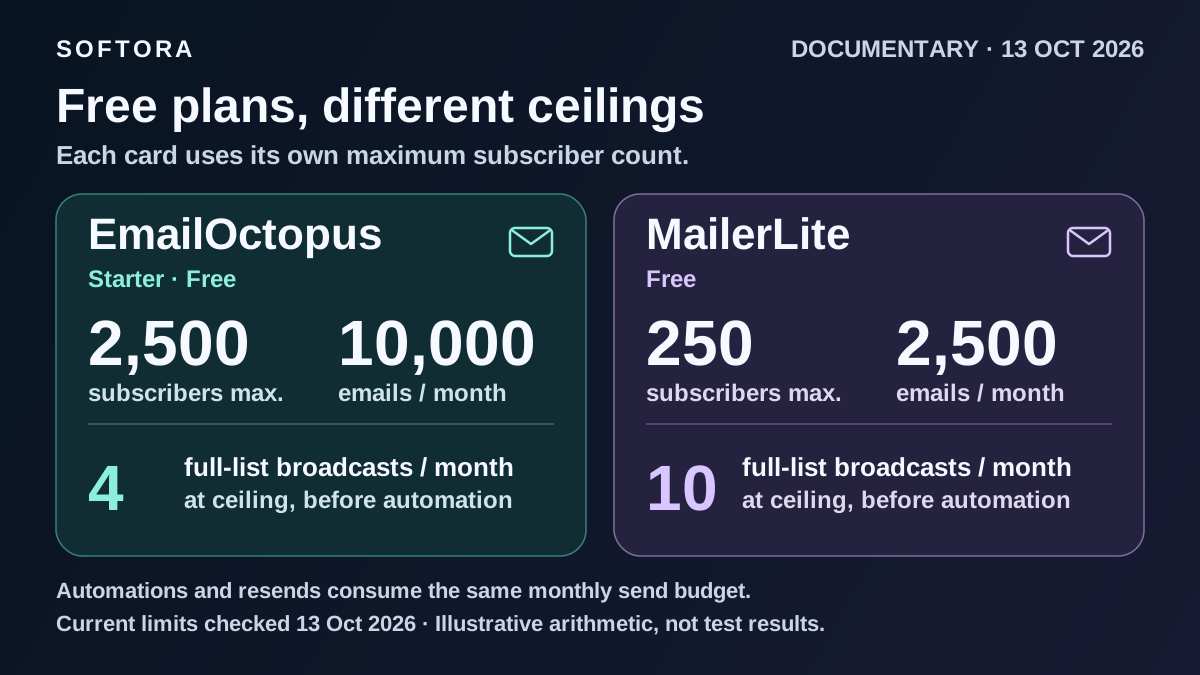
Current Free limits: EmailOctopus allows 2,500 subscribers/10,000 monthly emails; MailerLite allows 250/2,500. Older MailerLite free-plan headlines are not today's new-account offer.
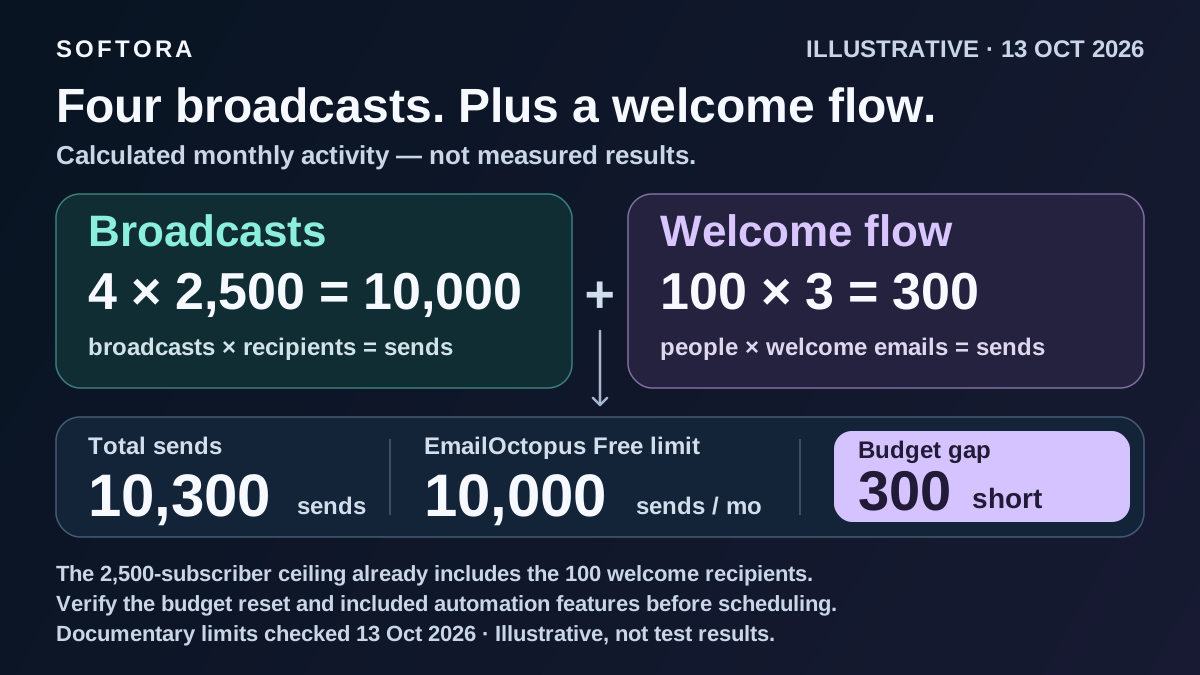
Four broadcasts to 2,500 recipients plus 100 three-email welcome sequences total 10,300 sends, exceeding EmailOctopus Free despite staying within its contact ceiling.
At 2,500 subscribers, regular monthly billing is $20 for EmailOctopus Pro, $33 for MailerLite Comfort, or $49 for Power. Compare quotas and features, not just these prices.
Both free plans cap each of three automations at five steps. EmailOctopus has documented branching; MailerLite Power adds multiple entry triggers, not unlimited steps.
MailerLite's official send-overage descriptions conflict. Confirm account behavior and protect opt-outs, workflow enrollment, and report archives before switching.
Quick Verdict: Buy Enough Sending Capacity, Not Just Contacts
EmailOctopus is the stronger starting point for a newsletter-first business that needs a larger free audience and can stay inside a modest sending budget. MailerLite deserves the shortlist when its forms, website tools, digital-product options, or particular automation triggers replace work you would otherwise do elsewhere. Neither is automatically cheaper for every workflow: the number of subscribed people and the number of emails sent are different limits.
At the current free-plan ceilings, EmailOctopus supports 2,500 subscribers and 10,000 emails per month; MailerLite supports 250 subscribers and 2,500 emails. That gives EmailOctopus ten times the subscriber capacity, but only four full-list broadcasts at its ceiling. Add a welcome sequence and the same list may already need more sending capacity. Start with the workload, not a generic winner badge.
Research method: official pricing calculators and help documents checked October 13, 2026. This is a documentary comparison, not a hands-on usability, inbox-placement, or migration test. Dollar prices below are regular USD offers before applicable taxes, not introductory promotions. The comparison covers the main EmailOctopus service and current MailerLite, not EmailOctopus Connect or MailerLite Classic. The email marketing category provides a wider shortlist if neither matches your requirements.
Free Plans: 2,500 Subscribers vs 250 Is Only Half the Comparison
The current EmailOctopus pricing table gives Starter 2,500 subscribers, 10,000 monthly emails, one user, one landing page, and one form. Reports are available for 30 days, and emails carry EmailOctopus branding. MailerLite's current pricing gives Free 250 subscribers, 2,500 monthly emails, two users, three active forms, one website, and one landing page. These are ongoing free plans; temporary access to paid features is not part of the comparison.
Both free offers list three automations with five steps per automation. Five steps does not mean five emails plus unlimited waiting and branching: those operations are workflow building blocks too. Sketch your actual sequence and confirm how the builder counts it. MailerLite's feature counts refer to active or published items, so a saved draft is not evidence that another live form or automation fits the plan.
Older MailerLite guides often quote 500 or 1,000 free subscribers, 12,000 sends, or Growing Business and Advanced plans. Those are not the current new-account offer checked here. MailerLite's billing guide dates its new pricing to June 16, 2026 and describes transition rules for earlier paid subscriptions; that is not proof of the exact date every free limit changed. Check an existing account's renewal terms. Our broader email-platform buyer's guide is useful for categories and use cases, but use dated primary sources for today's purchase.
| Requirement | EmailOctopus Starter | MailerLite Free |
|---|---|---|
| Subscriber ceiling | 2,500 | 250 active subscribers |
| Monthly emails | 10,000 | 2,500 |
| Automations / steps each | 3 / 5 | 3 active / 5 |
| Users | 1 | 2 |
| Forms | 1 | 3 active |
| Landing pages / website | 1 landing page | 1 landing page and 1 website |
| Branding | EmailOctopus branding | MailerLite branding |
| Report boundary | Reports available for 30 days | Default overview: last 30 days; not proof of report deletion |
| Digital product / booking | Not established as a comparable native entitlement here | 1 active |
Send Budget: Four Newsletters Can Use the Entire Free Allowance
Build a busy-month budget before comparing prices: total recipients across broadcasts, plus automated emails, plus any other sends counted by the provider. Count a resend as another send to its recipients. Use the provider's allowance-reset date, not an assumed calendar month, and leave room for an extra campaign. A weekly schedule can place five broadcasts in some months.
For 2,500 recipients, four broadcasts use 10,000 sends. If 100 subscribers also receive three welcome emails each, the total becomes 10,300, exceeding EmailOctopus Free by 300. A fifth full-list broadcast, even without automation, reaches 12,500. These are calculated scenarios, not measured campaign results. The modeled audience ceiling already includes the people receiving welcome emails; actual daily recipient counts may differ.
At the smaller MailerLite Free ceiling, eight broadcasts to 250 subscribers plus 300 welcome emails total 2,300 sends, leaving 200. Ten broadcasts would consume all 2,500 before welcome emails. A 2,000-person list sending four broadcasts plus those 300 automated emails needs 8,300 sends: it fits EmailOctopus Free on audience and volume, but not MailerLite Free's contact allowance. Features still need a separate check.
The useful comparison is therefore not simply 10,000 versus 2,500. Write down your maximum billable audience, campaign frequency, onboarding volume, and required workflow steps. A paid plan can be necessary because of branding, collaborators, or automation complexity even when the sending arithmetic fits a free tier.
| Audience / broadcasts | Broadcast sends | Welcome sends | Total | Free-plan fit by contacts + sends |
|---|---|---|---|---|
| 250 / 8 | 2,000 | 100 × 3 = 300 | 2,300 | Both; 200 sends left on MailerLite |
| 2,000 / 4 | 8,000 | 100 × 3 = 300 | 8,300 | EmailOctopus; MailerLite contact cap fails |
| 2,500 / 4 | 10,000 | 100 × 3 = 300 | 10,300 | Neither; EmailOctopus is 300 sends short |
| 2,500 / 5 | 12,500 | 0 | 12,500 | Neither; EmailOctopus is 2,500 sends short |
Paid Pricing at 500, 2,500 and 5,000 Subscribers
The table uses the same subscriber ceilings and billing choices from EmailOctopus's calculator and MailerLite's calculator. Monthly billing is separate from an annual payment's monthly equivalent. Annual totals are shown so a lower headline cannot hide the upfront commitment. Quotas remain monthly; paying annually does not create a freely interchangeable annual sending pool.
At 2,500 subscribers, EmailOctopus Pro is $20 on monthly billing versus $33 for MailerLite Comfort, a $13 monthly difference. Both allow 25,000 monthly emails at that tier. MailerLite Power is $49 and advertises unlimited monthly emails subject to fair use, alongside different feature limits. These are subscription comparisons, not claims that the plans do identical jobs or deliver identical results. Our Mailchimp alternatives guide is the next step if the shortlist needs to widen.
Two details prevent misleading comparisons. EmailOctopus Pro's $10 monthly entry configuration covers 500 subscribers, even though Free can hold 2,500; choose the paid tier for the audience you actually have. That 500-subscriber Pro tier includes 10,000 sends, so not every EmailOctopus quota is simply ten times contacts. At 5,000, its verified annual display is $28 per month equivalent, $336 upfront: do not substitute a calculation from a generic discount banner.
| Subscribers / plan | Monthly billing | Annual total | Annual monthly equivalent | Monthly emails |
|---|---|---|---|---|
| 500 — EmailOctopus Pro | $10 | $108 | $9 | 10,000 |
| 500 — MailerLite Comfort | $12 | $129.60 | $10.80 | 5,000 |
| 500 — MailerLite Power | $25 | $270 | $22.50 | Unlimited, subject to fair use |
| 2,500 — EmailOctopus Pro | $20 | $216 | $18 | 25,000 |
| 2,500 — MailerLite Comfort | $33 | $356.40 | $29.70 | 25,000 |
| 2,500 — MailerLite Power | $49 | $529.20 | $44.10 | Unlimited, subject to fair use |
| 5,000 — EmailOctopus Pro | $31.50 | $336 | $28 | 50,000 |
| 5,000 — MailerLite Comfort | $49 | $529.20 | $44.10 | 50,000 |
| 5,000 — MailerLite Power | $69 | $745.20 | $62.10 | Unlimited, subject to fair use |
Billing Rules: Duplicates, Cumulative Counts and Overage Uncertainty
EmailOctopus counts subscribed contacts separately in independent lists. The same address in two lists can count twice. Its billing explanation excludes unsubscribed and bounce/complaint-removed contacts, and describes automatic upgrades when subscribed totals exceed the selected tier. Annual growth can produce a prorated charge for the remaining term. One list with tags or segments often avoids unnecessary duplication, but do not merge or delete lists without checking permissions and reports.
MailerLite's plan-and-billing guide counts unique active subscribers cumulatively during the billing cycle. Deleting someone later does not erase their billable presence in that cycle. Comfort's email allowance is based on the tier ceiling, not simply the current live list. Free accounts above 250 active subscribers have campaigns and automations locked until the limit is resolved. Do not treat deleting, reimporting, or unsubscribing people as a dependable billing workaround.
There is an important official-source conflict about Comfort send overages. The pricing FAQ says to wait for the reset or upgrade to Power when the allowance is reached; the billing guide describes automatic tier upgrades and prorated charges for excess sending. Confirm the behavior for your account before a large campaign, rather than assuming either a hard stop or a guaranteed fixed bill. Record that answer alongside the rest of your digital marketing tool budget.
Automation: Count Steps, Entry Triggers and Repeat Behavior
Do not reduce this choice to 'EmailOctopus has basic automation, MailerLite has advanced automation.' EmailOctopus's advanced-automation guide documents tag-based entry, trigger filters, positive/negative condition paths, waits, and actions. Its Pro pricing lists up to 650 steps and three triggers. MailerLite Comfort permits 50 active automations, and Power unlimited active automations, but both list a 100-step limit per automation. A higher step ceiling alone does not establish a better workflow.
MailerLite's trigger documentation covers group joins, form completion, link clicks, field updates, dates, and segment entry. Power permits up to three entry triggers per automation. Multiple triggers are not the same thing as branches inside a flow. Store-related triggers also depend on the supported integration and newsletter permission; a product purchase is not blanket permission to send marketing.
Re-entry can matter more than another template. In EmailOctopus, completed subscribers can repeat when enabled and the trigger matches again; adding new steps does not automatically send them to contacts who already finished. An automation's list cannot be changed after activation. In MailerLite, a group-join repeat requires permission, actual removal and rejoining, and no more than one trigger per 24 hours. Its segment-triggered flow removes people when they stop matching. Test the lifecycle you need, not just whether the first email arrives.
Before upgrading, map one representative flow: entry, delay, condition, email, exit, and repeat rule. Include a subscriber with missing fields and one who opts out. If an outside connector is required, use the Zapier vs Make guide and automation tools category to budget that dependency separately; an integration logo does not prove your specific trigger, action, or permission check is supported.
Forms, Websites and Commerce: Pay for the Workflow You Need
MailerLite can be attractive when email is only part of a small publishing setup. Its current plan table includes one active digital product or booking on Free and five on Comfort. Comfort also lists ten active forms and ten websites/landing pages combined, not ten of each. Check payment-provider eligibility, fees, and the exact selling workflow separately before treating those features as a complete commerce system.
EmailOctopus Pro instead lists unlimited users, forms, and landing pages, with branding removal. If your site already runs on Carrd or another builder, paying for a second website tool may not remove any work. If you need multiple team logins, compare EmailOctopus Pro's user allowance with MailerLite Comfort's three seats and Power's unlimited seats, rather than buying from a subscriber-price row alone.
Use the creator software guide to separate audience capture, publishing, selling, and fulfillment. A paid-newsletter business also needs a decision about recurring payments and cancellation behavior; the Flodesk vs Kit comparison examines that different requirement. This article does not establish seller-country eligibility or transferable recurring billing for either platform.
Reporting: A 30-Day View Is Not a 30-Day Retention Policy
EmailOctopus Free explicitly makes reports available for 30 days, while Pro advertises reports available forever. Treat that as a plan's advertised access, not an independent legal-retention guarantee or a promise that an upgrade restores previously unavailable records. Decide what campaign evidence you need to preserve before relying on the dashboard as the only archive.
MailerLite's reporting guide describes a default last-30-days dashboard overview and paid access to changing that date range. That is not evidence that all campaign reports are deleted after 30 days. The source documents CSV/PDF reporting routes but does not clearly settle every Free-versus-paid export entitlement. We could not verify a single retention period covering all MailerLite reports, so none is assumed here.
Before switching, inventory the actual outputs: campaign totals, recipient activity, automation participants, and any evidence your business must retain. A screenshot of a summary does not preserve the underlying recipient records. Use the appropriate administrator account and check the downloaded fields; plan labels and generic 'export available' feature badges do not tell you whether the needed history is included.
Deliverability: Authenticate the Domain and Test Permission Handling
Both choices need proper sender setup. EmailOctopus's domain-verification guide describes its CNAME/TXT records, SPF on the sending subdomain, and DMARC verification. MailerLite's authentication guide requires authentication for custom-domain sending outside the initial trial exception. Follow the records generated for your account and preserve existing authentication; do not blindly replace a working DNS or DMARC policy.
Authentication is not a guarantee of inbox placement. List permission, unwanted-mail complaints, recipient behavior, and the content and frequency of messages still matter. No matched deliverability experiment was performed for this comparison, so there is no invented inbox score or universal winner. In an authorized pilot, use controlled addresses to inspect the sender, unsubscribe link, suppression behavior, and the actual inbox result before scheduling a larger campaign.
Keep marketing automation separate from application email. MailerLite's Free-plan API/MCP access does not include sending, according to its pricing table; an API connection is not a free sending entitlement. If the requirement is password resets, receipts, or application events rather than a subscribed newsletter, the Resend vs Postmark comparison covers that different delivery workflow.
Migration Checklist: Move Permission, Not Just Email Addresses
1. Export the right populations and fields. MailerLite's subscriber-export guide makes exports administrator-only and bases additional fields on the visible columns. Enable Groups explicitly if memberships matter. Preserve active, unconfirmed, unsubscribed, bounced, and complaint populations separately, plus the permission evidence you are authorized to hold. A count of email addresses alone is not a verified migration.
2. Protect opt-outs before any send. EmailOctopus's switching guide recommends importing suppressed contacts as Unsubscribed and mapping fields and tags deliberately. MailerLite's import guide rejects certain addresses already known as unsubscribed, bounced, unconfirmed, or spam complaints. That protection does not prove a CSV from another provider automatically carries those statuses across. Validate destination suppression and never reactivate bounced or opted-out people merely to make an import succeed.
3. Separate data from the operating setup. A subscriber CSV or automation-participant export is not a portable workflow definition, template collection, or complete account backup. Inventory forms, embedded signup code, groups/tags, custom fields, templates, triggers, delays, exclusions, and tracking links. Rebuild or verify the supported transfer route for each item. Retain historical engagement categories as tags where appropriate rather than pretending old campaign reports have become native destination reports.
4. Control enrollment during cutover. Both vendors document import options that affect whether contacts enter automations. Keep destination sending paused until those options and suppression are checked. Someone who already completed a welcome sequence should not receive it again merely because a group or tag was imported. Validate a small authorized sample, reconcile statuses and counts, then switch signup forms and schedules without leaving two competing welcome flows running.
5. Preserve evidence before canceling or deleting. EmailOctopus's list-merging guide warns that temporary duplicate lists can raise the subscribed count and that deleting source lists removes contacts' email-address visibility from related reports. Export needed reports first and verify the destination before removing the source. No migration was performed for this article; these are checks to run, not a promise of a thirty-minute or one-click switch.
Which Plan Fits Your Next Six Months?
Shortlist EmailOctopus Free for a newsletter with up to 2,500 subscribers, a workload below 10,000 monthly emails, and simple enough requirements to fit its user, form, and automation caps. Consider Pro when volume, branding, collaborators, report access, or workflow depth require it. For the worked 2,500-person, 10,300-send scenario, Pro's 25,000-email tier provides volume headroom, but the rest of the workflow still needs validation.
Shortlist MailerLite Free for a much smaller audience that benefits from its included website, forms, and limited automation. Compare Comfort when its combined publishing tools and quotas fit; examine Power when multi-trigger workflows, additional seats, or its fair-use-governed sending model matter. Do not upgrade only because an older article calls MailerLite's automation unlimited, and resolve the documented overage conflict before relying on a fixed spending ceiling.
Finally, keep the product boundary clear: EmailOctopus Connect requires an AWS account and an Amazon SES connection; Amazon SES charges are a separate cost consideration. The main-product prices above are not Connect quotes. Record your chosen account's limits, quote, renewal date, overage handling, and export procedure using our software evaluation checklist, then run one permission-safe pilot before moving the newsletter.
Buyer checklist before you choose
Common mistakes to avoid
Helpful Softora links
Frequently asked questions
Is MailerLite still free for 1,000 subscribers?
Not under the current new-account offer checked October 13, 2026. MailerLite Free lists 250 active subscribers and 2,500 monthly emails. Older 500/1,000-subscriber figures, Classic accounts, and temporary trial access should not be substituted for the current plan. Existing paid-account transition and renewal rules need a separate check.
Is EmailOctopus cheaper than MailerLite at 2,500 subscribers?
For regular monthly billing, EmailOctopus Pro is $20, MailerLite Comfort $33, and Power $49 at that subscriber ceiling. Pro and Comfort each allow 25,000 monthly emails there; Power advertises unlimited emails subject to fair use. EmailOctopus Free may suffice below 10,000 monthly sends, but collaboration, branding and automation requirements can require a paid plan.
Can EmailOctopus Free send a weekly newsletter to 2,500 people?
Four full-list broadcasts use all 10,000 monthly emails, leaving nothing for welcome sequences or resends. Five broadcasts require 12,500. Check the actual reset period and recipient counts rather than assuming every weekly schedule fits; 100 people receiving three additional welcome emails would bring the four-broadcast example to 10,300.
Does EmailOctopus support branching automations?
Yes, its documented advanced-automation builder includes conditions with positive and negative paths, trigger filters, waits and actions. Free allows three automations with five steps each; Pro lists up to 650 steps and three triggers. Verify the intended workflow in the chosen plan rather than describing EmailOctopus as a basic-drip-only product.
Does MailerLite include unlimited email sending?
Free lists 2,500 monthly emails. Comfort has a tier-based allowance, such as 25,000 at 2,500 subscribers. Power advertises unlimited monthly sending subject to fair use. Pricing and billing documentation describe Comfort overages differently, so confirm whether your account stops, requires an upgrade, or automatically incurs a prorated higher-tier charge.
Will a CSV move my unsubscribes and automations safely?
Not automatically. Map permission statuses and verify destination suppression before sending. MailerLite exports depend on selected columns, including Groups, and require administrator access. Subscriber or automation-participant exports are not full workflow definitions, templates or historical report archives. Check import enrollment so migrated contacts do not restart welcome sequences unintentionally.
Do I need Amazon SES to use EmailOctopus?
Not for the main EmailOctopus product compared here. EmailOctopus Connect is a separate option that requires an AWS account and an Amazon SES connection, with SES charges considered separately. Do not compare a Connect headline price with the main EmailOctopus or MailerLite subscription without accounting for that different setup.
Get practical software advice every week.
Join Softora readers who get SaaS buying guides, pricing changes, and comparison notes without the marketing noise.


