Softora
Home
Categories
CRM & SalesEmail MarketingProject ManagementAccounting & InvoicingCustomer SupportHR & PayrollSEO & AnalyticsWebsite BuildersAI ToolsNo-Code & AutomationTeam CommunicationHosting & DevOpsE-commerce Platforms
BlogBest SoftwareCompare ToolsResourcesContact
Home/Compare Tools/Vultr vs Hetzner
Hosting & DevOps comparison

Vultr vs Hetzner (2026): Regional Costs, Traffic & Backups

Compare specific Vultr and Hetzner Cloud plans in Germany and Singapore, including IPv4, outbound transfer, backups, snapshots, billing, and migration costs.

Updated October 16, 202616 min read
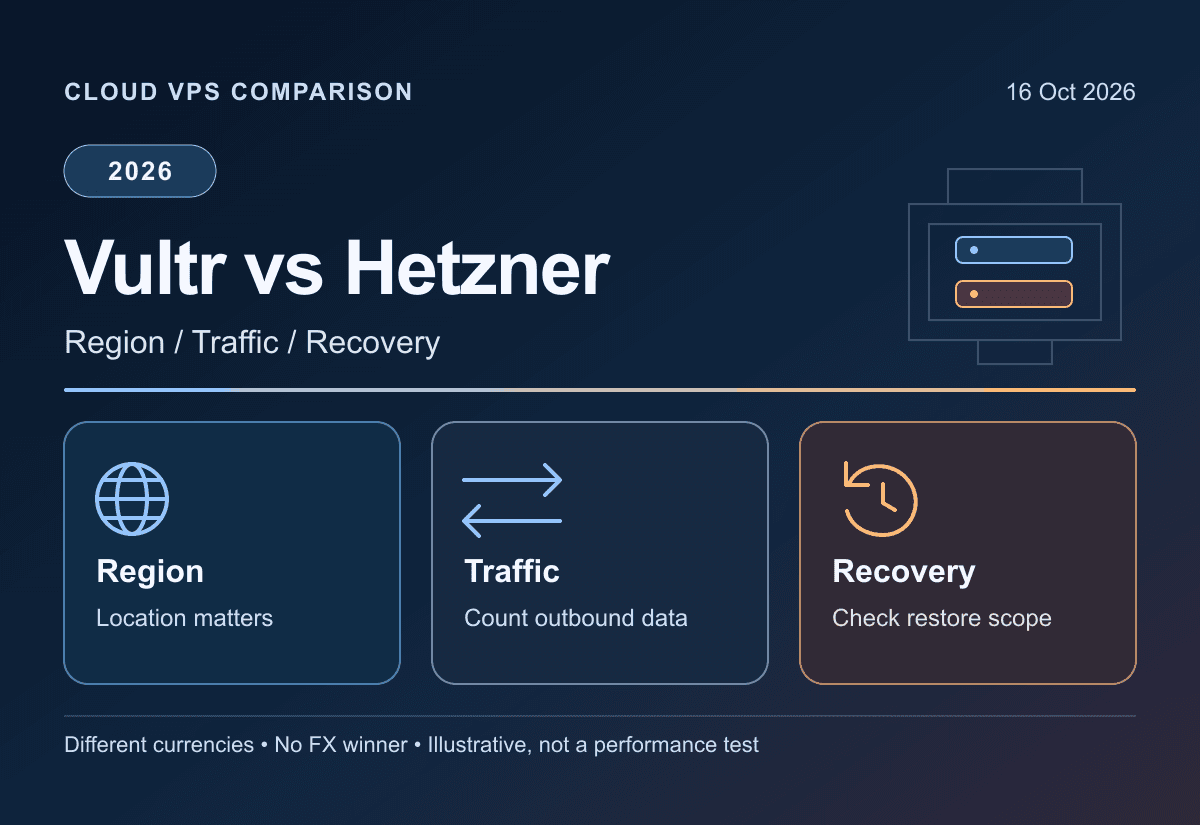
Original Vultr versus Hetzner Cloud illustration showing regional compute, outbound traffic and recovery responsibilities
VultrvsHetzner Cloud

Key takeaways

1

Compare specific regional plans, not headline minimums. The selected offers share 2 vCPU/4 GB/80 GB resource counts but differ in CPU, disk type, location, currency and transfer terms.

2

Illustrative full-month budgets with IPv4, automatic backups and 20 compressed snapshot GB-months are US$25.00 versus €24.17 in Germany, and US$25.00 versus €39.97 in Singapore. No FX or performance winner is implied.

3

Vultr's eligible pooled transfer allocations accrue hourly. Hetzner's selected CPX22 includes 20 TB in Nuremberg but 1 TB in Singapore; alerts are not spending caps.

4

Both bill stopped servers. VM backups exclude attached volumes, and a provider-native snapshot is not a complete independent migration archive. Verify recovery before deleting resources.

Softora verdict

Vultr for a matching regional deployment and pooled transfer; Hetzner for a fitting regional quote

Choose between the actual server and region available to your account, not the cheapest homepage amount. The selected Germany and Singapore offers have matched resource counts but different processors, storage types, currencies and transfer allowances. Vultr's global transfer pooling can matter; Hetzner's regional allowance can matter. Include backups, retained resources and recovery work before selecting either. No performance, latency or uptime winner was measured.

Regional Cloud Compute with pooled egress

Vultr

Teams able to operate their own Linux servers, whose target region and selected Cloud Compute configuration are available and whose transfer usage fits the documented accrued pool.

Selected Regular Cloud Compute: 2 vCPU, 4 GB RAM, 80 GB SSD at US$20/month, with advertised 3 TB transfer. Automatic backups add 20% of compute; snapshots $0.05/compressed GB-month. Taxes and other resources are separate.

Strengths

  • Public plan and location catalog
  • Global account-level transfer pooling with hourly accrual
  • Documented backup schedules and cross-region snapshot reuse

Watch for

  • Website/API hourly quotes disagree for the selected plan
  • Stopped instances remain billable until destroyed
  • Snapshots cannot be directly downloaded as a migration archive
Read full review

Region-specific shared and dedicated compute

Hetzner Cloud

Teams whose workload, location, architecture and operating responsibilities fit a currently available Cloud plan and who can budget transfer and recovery separately.

Selected CPX22: 2 vCPU, 4 GB RAM, 80 GB NVMe. Nuremberg €19.99/month including Primary IPv4, Singapore €26.99; selected table excludes VAT. Backups add 20% of VM price; snapshots €0.0143/compressed GB-month.

Strengths

  • Explicit hourly/monthly-cap billing
  • Selected European CPX22 includes 20 TB outgoing traffic
  • Separate Primary IP resources and documented backup lifecycle

Watch for

  • Selected Singapore CPX22 includes 1 TB, not Europe's 20 TB
  • Attached Volumes are outside VM backups/snapshots
  • Server deletion removes its backups; retained snapshots/IPs can still bill
Read full review

Decision table

Where each tool wins

Vultr vs Hetzner: feature boundaries and conditional recommendations
FactorVultrHetzner CloudWinner
Matched resource count2 shared Intel vCPU, 4 GB RAM, 80 GB SSDCPX22: 2 shared AMD vCPU, 4 GB RAM, 80 GB NVMeNot an equal-hardware benchmark
Germany base offerFrankfurt: US$20/monthNuremberg: €19.99/month including Primary IPv4, netDifferent currencies; no FX winner asserted
Singapore base offerUS$20/month for the selected catalog plan€26.99/month including Primary IPv4, netVerify stock and account quote
Selected Europe transfer3 TB advertised, plus eligible accrued account pool20 TB on selected CPX22Workload and accounting rules decide
Selected Singapore transfer3 TB advertised on selected plan1 TB on selected CPX22Do not reuse European assumptions
Outbound excess$0.01/GB after accrued pooled allowance€1/TB Europe/US; €7.40/TB SingaporeKeep currency, unit and region explicit
Automatic VM backups20% of base compute; attached storage excluded20% of VM price; attached Volumes excludedNeither is a complete application-backup plan
Power offBilling continues while instance existsBilling continues while server existsNeither treats stopped as deleted
Snapshot migrationNo direct download; restore an instance and export dataNative image restore is documented, not cross-provider app migrationTest a separate data recovery route
Observed performanceNo server or latency benchmark performedNo server or latency benchmark performedMeasure the actual deployment

Best-fit buyer profile

Which tool fits your team better?

The winner depends on workflow maturity, team size, budget, and how much structure your team can maintain after the trial ends.

Choose Vultr if...

The selected Vultr product and target region are actually available for the account and image.
Global account-level pooling suits the workload after hourly accrual and other applications are considered.
The team can own the Linux system, attached-storage backups and a temporary-instance export process.
The account quote resolves hourly-price ambiguity when partial-month costs matter.

Choose Hetzner Cloud if...

A currently available regional Cloud plan matches the architecture and operational requirements.
The chosen region's exact traffic allowance and overage rate fit the actual outgoing workload.
The budget includes Primary IPv4, server-only backup percentage and retained storage charges.
Recovery remains valid after server deletion, with separate Volume and application-data protection.

In this comparison

The Short Answer: Compare the Server You Can Actually RunRegional Plans: Same Resource Counts, Different Hardware and CurrencyBilling Units: Monthly Caps Do Not Resolve Every Hourly QuoteBandwidth: Direction, Region and Accrued Allowance MatterTwo Monthly Budgets: Germany and Singapore Without a Fake Currency WinnerBackups: Twenty Percent Does Not Protect Every Storage DeviceSnapshots and Portability: A Saved Image Is Not a Downloadable Exit ArchiveStopped Servers and Retained Resources: Build a Deletion ChecklistPerformance and Availability: Define a Reproducible EvaluationMigration Plan and Conditional VerdictDecision checklistCommon mistakesMigration questions

The Short Answer: Compare the Server You Can Actually Run

Vultr vs Hetzner is not settled by putting a dollar headline next to a euro headline. Choose the region, architecture, usable memory, disk and operating responsibilities first. Vultr can suit a workload that benefits from its available locations and account-level transfer pool. Hetzner can suit a workload whose selected regional quote and traffic allowance fit. Neither removes the customer's responsibility for the Linux system, application, monitoring or recovery.

This comparison uses official sources checked October 16, 2026. It is documentary research, not a server benchmark, stock check, latency test or completed migration. The examples concern unmanaged Linux on shared x86 CPU with two vCPUs, 4 GB RAM and an 80 GB disk. CPU vendors and disk types differ. USD and EUR amounts remain separate, taxes are excluded where stated, and monthly examples are budgets rather than measured invoices. The Vultr review and Hetzner review provide wider context.

If the team wants managed deployments rather than responsibility for servers, start with the hosting category. A virtual machine is not a like-for-like replacement for every workflow supplied by Vercel or Render. Keeping those operational differences visible is more useful than claiming a cheaper VM automatically lowers the whole cost of running an application.

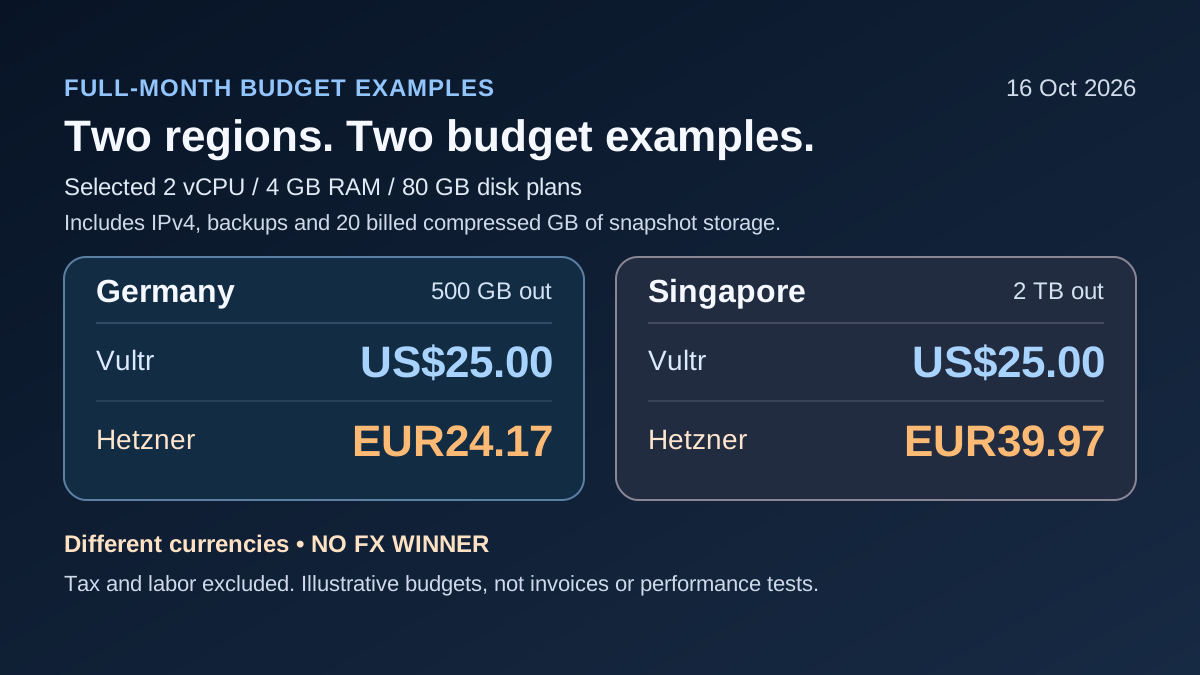
Illustrative full-month Germany and Singapore budgets in separate USD and EUR currencies, with backups and snapshot storage
Calculated advertised-price budgets, not measured invoices or performance tests. The selected region, external outgoing traffic, IPv4, backup and compressed snapshot assumptions are explicit; taxes and operating labor are excluded.

Regional Plans: Same Resource Counts, Different Hardware and Currency

Vultr's public plan catalog lists vc2-2c-4gb at $20/month with two vCPUs, 4 GB RAM and 80 GB SSD; its location associations include Frankfurt and Singapore. The region catalog identifies those region codes. This is the Regular Cloud Compute configuration, not a High Frequency or dedicated-CPU offer substituted to improve a comparison. Catalog association does not guarantee deployable stock for the account or image you choose.

Hetzner's Regular Performance table lists CPX22 with two AMD vCPUs, 4 GB RAM and 80 GB NVMe. The selected Nuremberg offer is €19.99/month including Primary IPv4; Singapore is €26.99. Its table explicitly says IPv4 included and VAT excluded, despite a contradictory generic VAT footer. The calculator separates the VM amounts, €19.49 and €26.49, from the €0.50 Primary IPv4. Verify the final tax treatment for your billing country.

Germany is country-matched here, not city-matched: Frankfurt and Nuremberg are different locations. The selected US Hetzner CPX21 instead has three vCPUs and 4 GB RAM, while CPX11 has two vCPUs but 2 GB RAM; neither should be relabeled as an identical two-vCPU/4-GB offer. Similarly, Intel/shared/SSD and AMD/shared/NVMe do not establish equal throughput. The Node.js hosting guide can narrow the platform type, but capacity and location still need a current account-level check.

Observed public catalog offers checked October 16, 2026; 2 shared x86 vCPU, 4 GB RAM and 80 GB capacity, not equal hardware or available-stock guarantees
Provider / locationSelected planCompute and IPv4 per monthDisk / CPUAdvertised included transfer
Vultr / Frankfurtvc2-2c-4gb RegularUS$2080 GB SSD / shared Intel3 TB; API reports 3072 GB
Hetzner / NurembergCPX22€19.49 + €0.50 = €19.99 net80 GB NVMe / shared AMD20 TB
Vultr / Singaporevc2-2c-4gb RegularUS$2080 GB SSD / shared Intel3 TB; API reports 3072 GB
Hetzner / SingaporeCPX22€26.49 + €0.50 = €26.99 net80 GB NVMe / shared AMD1 TB
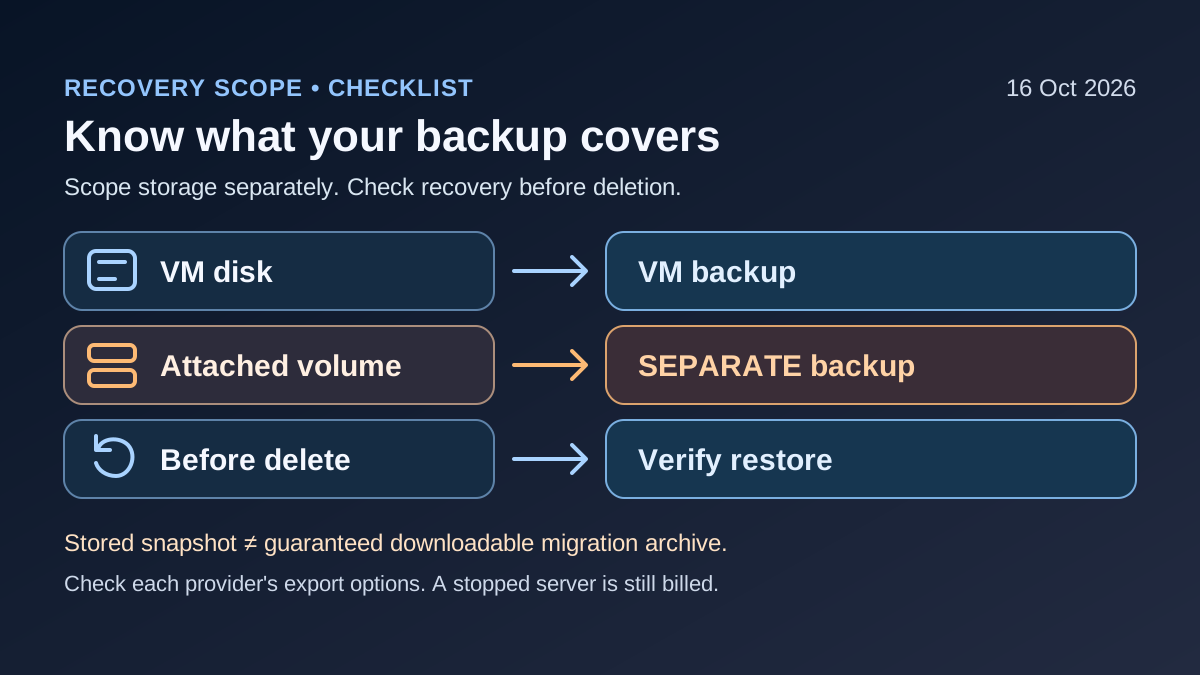
VM backup and attached-volume backup are separate; verify restoration and retained resource charges before deleting a server
Proposed recovery checklist. A stopped machine still bills, and a VM image does not establish complete application recovery or a directly downloadable cross-provider archive.

Billing Units: Monthly Caps Do Not Resolve Every Hourly Quote

Vultr's billing documentation describes hourly charging and a one-hour minimum, with the documented 672-hour cap for ordinary Cloud Compute. However, the selected plan's public API reports $0.027/hour while the pricing page displays $0.030/hour; both show $20 monthly. Those values do not reconcile into one unambiguous partial-month invoice. The budgets below use the advertised monthly amount and explicitly do not predict hourly or short-lived-server bills.

Hetzner's billing FAQ charges the lesser of its monthly cap or rounded-up hourly usage. It also distinguishes Primary IP resources from the VM and charges retained unassigned IPv4 addresses. Its selected EUR offers are not converted into dollar prices in this comparison. A currency conversion, exchange fee and customer-specific tax could change the apparent order of the headline amounts; none is invented here.

Write down compute, IPs, automatic backups, retained snapshots, attached storage, outbound excess and optional services as separate budget lines. Add operating time and migration overlap outside the provider bill. The SaaS spending framework is useful for distinguishing a recurring platform charge from the whole workflow cost. Pricing a server without the services needed to recover it is not a complete production budget.

Bandwidth: Direction, Region and Accrued Allowance Matter

Vultr's published transfer policy documents free inbound traffic, global account-level pooling, an additional 2 TB monthly account allowance and $0.01/GB outbound excess. All allocations accrue hourly, including the account allowance. This is a policy introduced in 2023 and rechecked now, not a new 2026 offer. Do not assume a newly created server immediately receives every byte of the month-end pool.

The selected Vultr plan is advertised as 3 TB transfer, while its API reports 3072 GB. Use compatible provider billing units rather than silently swapping decimal and binary conversions. The useful excess calculation is billable outgoing traffic minus the eligible accrued pool, floored at zero, then multiplied by the overage rate. Other workloads in the same account can consume the shared pool; account-level capacity is not a dedicated reservation for one application.

Hetzner bills outgoing traffic but excludes incoming and defined internal traffic. Same-network-zone public traffic between its Cloud servers is treated differently from public traffic across network zones. Its selected CPX22 includes 20 TB in Nuremberg but 1 TB in Singapore; published excess rates are €1/TB in Europe/US and €7.40/TB in Singapore. Excess is rounded up in 100 MB blocks, not necessarily whole terabytes. A region label alone is insufficient: exact US plan allowances can differ too.

The reviewed Hetzner sources did not settle project pooling or the partial-month allowance formula, so neither is assumed. The examples use one continuously retained server for a full month. Usage alerts are notifications, not a hard spending limit. If transfer cost is the reason for leaving a platform, use the Vercel alternatives guide to keep managed-service scope separate from these infrastructure-only calculations.

Two Monthly Budgets: Germany and Singapore Without a Fake Currency Winner

Both scenarios assume the selected VM exists for the whole month, traffic is spread through the month, automatic backups remain enabled and one IPv4 is present. They also include twenty provider-billed compressed GB-months of separate snapshot storage. There are no attached volumes, paid operating-system licences, extra services, taxes or operator wages. These are calculated advertised-cap budgets, not product tests or promised invoices.

In Germany with 500 GB external outgoing traffic, Vultr's example is $20 compute plus $4 automatic backups plus $1 snapshots, or $25.00. Hetzner's is €19.49 compute plus €0.50 IPv4, €3.898 backups and €0.286 snapshots, totaling €24.174 before final rounding, or €24.17. The two totals cannot establish a cheaper provider without an explicit currency basis. Matching RAM and disk size also does not make the performance identical.

For Singapore with 2 TB outgoing traffic in the provider's billing units, the selected Vultr instance remains within its advertised allowance, so the example is again $25.00. Hetzner's 1 TB allowance leaves 1 TB at €7.40, producing €39.974 before rounding, or €39.97. This example deliberately stays below Vultr's instance allowance without relying on the extra account pool. For a burst early in a partial month, obtain the actual accrued allowance instead of copying this result. The startup hosting guide can help decide whether operating a VM is justified in the first place.

Full-month advertised-price scenarios with traffic spread through the month, one IPv4, automatic VM backups and 20 billed compressed GB-months of snapshots; excludes tax, volumes, optional services and labor
ScenarioCompute + IPv420% VM backupSnapshot storageOutbound excessTotal, rounded last
Germany / Vultr / 500 GB out$20.00$4.00$1.00$0US$25.00
Germany / Hetzner / 500 GB out€19.49 + €0.50€3.898€0.286€0€24.17
Singapore / Vultr / 2 TB out$20.00$4.00$1.00$0US$25.00
Singapore / Hetzner / 2 TB out€26.49 + €0.50€5.298€0.286€7.40€39.97

Backups: Twenty Percent Does Not Protect Every Storage Device

Both documented automatic-backup charges are twenty percent of the parent VM price, not twenty percent of an invoice containing IPs, traffic and separate storage. Vultr's backup FAQ describes scheduling choices and excludes attached storage from the instance backup. Hetzner's backup and snapshot FAQ explicitly excludes Volumes from both image types. A database placed on an attached volume therefore needs its own protection plan.

Hetzner provides seven rotating daily backup slots tied to the server; deleting the server deletes those backups. A separately retained Snapshot survives server deletion and continues to incur storage charges. That distinction matters when following advice to snapshot and delete a powered-off machine. Confirm that the surviving recovery object actually exists before removing the only running source, and retain independent application data where the recovery requirement calls for it.

A VM image also does not prove application consistency. An active database, external object storage and a service holding secrets may need separate, coordinated backups. In a future authorized restore exercise, verify the database, uploaded files, ownership, permissions and application startup. This article did not run a restore. For workloads connected to DigitalOcean or another provider, evaluate each service's coverage separately instead of assuming one VM snapshot includes the entire stack.

Snapshots and Portability: A Saved Image Is Not a Downloadable Exit Archive

Vultr's snapshot FAQ prices compressed stored size at $0.05/GB-month. Hetzner's current pricing lists €0.0143/GB-month, and its billing FAQ also bases charges on compressed storage and the time it exists. The nominal 80 GB disk, filesystem usage, compressed billed size and restore-target disk size are different measurements. The twenty-GB snapshot assumption in the budget is a billing input, not a compression guarantee.

The Vultr data-portability guide explicitly says snapshots and backups cannot be downloaded directly. Its documented route restores a temporary instance and retrieves data through operating-system tools. That can add temporary compute, transfer and administration costs. An image identifier or API resource URL is not evidence of a transferable raw disk download, and a saved provider-native snapshot is not automatically a vendor-independent backup.

Hetzner documents restoring or creating servers from its native images, with architecture constraints; that is not proof of a seamless cross-provider image migration. Both providers describe regional reuse inside their own systems, which does not establish available destination stock or a complete change of data location. Hetzner's Singapore image storage remains in Singapore under its documented rules. Keep file, database, configuration and secret recovery separate in the software evaluation checklist.

Documented recovery boundaries and proposed checks; no restore or cross-provider migration was performed
Artifact / actionVultrHetzner CloudAcceptance check
Automatic VM backup20% base-compute fee; attached storage excluded20% VM fee; Volumes excluded; 7 rotating slotsRecover each actual data location
Retained snapshot$0.05/compressed GB-month€0.0143/compressed GB-monthVerify retention, billed size and compatible restore target
Direct snapshot downloadOfficial guide says not supported; temporary instance export routeReviewed evidence establishes native restore, not cross-provider image exportRetrieve independent files, databases and configuration
Server deletionCheck retained snapshots/storage and other resourcesServer-linked backups disappear; snapshots and retained IPv4 differConfirm surviving recovery copy before deletion

Stopped Servers and Retained Resources: Build a Deletion Checklist

Both providers bill a server while it exists, including when powered off. Stopping the guest operating system or clicking power off is not cancellation. Deleting a machine stops that resource's future compute accrual but can leave billable snapshots, attached storage or IPs behind. Hetzner explicitly bills retained unassigned Primary IPv4 addresses. Inspect the account's resources rather than treating a successful VM deletion message as a complete zero-bill confirmation.

Do not delete first and discover missing data later. Record the recovery copy, its access owner, required credentials, retention decision and expected remaining charges. The person approving shutdown should know which backups disappear with the server and which snapshots remain. The cloud-storage guide distinguishes storage from a backup process; merely placing a file somewhere is not evidence of tested recovery. Refund or unused-credit eligibility is not established by stopping future resource charges.

Performance and Availability: Define a Reproducible Evaluation

A shared vCPU count is not a benchmark. CPU generation, neighbors, disk behavior, network path and the application can dominate the result. Hetzner's server FAQ discusses shared resources, rescaling and architecture restrictions; Vultr's product families likewise differ. Do not compare a shared plan against dedicated cores or substitute a High Frequency result into the Regular plan budget.

If latency or throughput decides the purchase, run an authorized small evaluation in the actual target region and record the plan identifier, image, software versions, dataset, concurrency and test period. Measure the application behavior and restore time you care about, not just a provider's marketing score. Germany-to-user latency cannot be inferred from Singapore pricing. Stock and account restrictions can change the feasible plan before any performance comparison begins.

The customer still needs an owner for OS patches, SSH access, firewall rules, monitoring, database maintenance and backups. A provider compliance label does not certify a particular deployed application or settle its contractual data-location requirements. If that operational burden is unsuitable, compare Railway or Render as different service models instead of choosing the lowest compute amount and leaving administration unassigned.

Migration Plan and Conditional Verdict

Map the existing system before moving: compute architecture, databases, uploads, background jobs, DNS, certificates, mail delivery, monitoring and secrets. Obtain a consistent data copy, restore to an authorized destination, validate record counts and file access, then rehearse cutover and rollback. Allow for an overlap period where both providers bill. An application repository is only one part of the system; it does not automatically contain production state or recovery credentials.

Choose Vultr provisionally if the actual available regional configuration and accrued transfer pool fit the workload and the team can operate it. Choose Hetzner provisionally if its available regional plan, currency, IP and transfer terms fit better. Confirm the hourly discrepancy before a short-lived Vultr deployment and the unresolved allowance rules before a partial-month Hetzner estimate. Neither choice guarantees faster pages, uptime or search rankings. A current quote and a measured, permission-safe workload test are the decision evidence.

Decision checklist

Record plan ID, region, CPU sharing model, architecture, RAM, disk capacity/type and current stock.
Keep currency and tax labels explicit; do not infer a cross-currency savings percentage.
Budget compute, IPv4, backup, snapshot, attached storage and outbound excess separately.
Verify transfer direction, regional allowance, accrual and any unresolved pooling/proration rules.
Assign an operator for patching, access, monitoring, database consistency and tested recovery.
Rehearse independent data export, destination restoration, cutover and resource cleanup before retirement.

Common mistakes to avoid

Comparing IPv6-only minimums, mismatched RAM or shared versus dedicated cores as equivalent servers.
Treating a catalog region listing as proof of current capacity or measured latency.
Assuming Europe's 20 TB applies in Singapore or that a new Vultr instance gets the entire monthly pool immediately.
Applying the backup percentage to the whole invoice or assuming VM backups include attached volumes.
Calling power off cancellation or assuming every remaining IP/snapshot disappears with the VM.
Treating a native image as a directly downloadable migration archive or inventing an hourly invoice from contradictory figures.

Migration questions before switching

Which databases, files, volumes, external services and secrets are outside the VM's native image?
Can the destination run the actual CPU architecture and recover to the required disk size?
What temporary compute, transfer and parallel-operation costs are needed for an independent export?
What record/file checks, monitoring and rollback criteria must pass before DNS changes?
Which recovery copies and billable resources survive server deletion, and who owns their retention?

Helpful Softora links

Vultr ReviewHetzner ReviewHosting and DevOps CategoryNode.js HostingVercel AlternativesStartup Hosting GuideCloud Storage GuideSoftware Evaluation Checklist

FAQs

Common questions about Vultr vs Hetzner

Is Hetzner always cheaper than Vultr?

No universal conclusion follows from these examples. The selected offers use EUR and USD, different processors and disk types, and region-specific transfer terms. The Germany budget is US$25.00 versus €24.17; Singapore is US$25.00 versus €39.97 under stated full-month assumptions. No currency conversion or identical-performance claim is made.

Which plans are compared here?

Vultr Regular Cloud Compute vc2-2c-4gb and Hetzner CPX22, with two shared x86 vCPUs, 4 GB RAM and 80 GB disk capacity. Vultr uses Intel/SSD and Hetzner AMD/NVMe. Germany compares Frankfurt with Nuremberg; Singapore is the other selected region. Catalog entries do not guarantee current stock or equal performance.

Does Vultr include an extra 2 TB of free transfer immediately?

Its published policy adds 2 TB per account per month and pools transfer globally, but all allowances accrue hourly. A new or short-lived deployment should not assume the full month-end allocation is immediately usable. Other workloads can consume the account pool, and excess outbound traffic is $0.01/GB under the stated policy.

Does Hetzner include 20 TB in every location?

No. The selected CPX22 includes 20 TB in Nuremberg but 1 TB in Singapore. Exact US plans can have different allowances too. The documented excess rates are €1/TB for Europe/US and €7.40/TB for Singapore, with excess rounded upward in 100 MB blocks. Check the selected plan and billing units.

Do powered-off servers stop billing?

No. Both providers charge while the server exists, even when powered off. Deleting a server does not necessarily delete retained snapshots, storage or IP resources. Hetzner explicitly bills unassigned retained Primary IPv4 addresses. Verify recovery first, then inspect every remaining billable resource.

Do automatic backups include attached volumes?

No blanket full-stack coverage applies. Vultr's instance-backup documentation excludes attached storage, and Hetzner excludes Volumes from VM Backups and Snapshots. Protect those datasets separately and verify application/database consistency. Hetzner's server-linked backups are removed with the server; retained Snapshots have a different lifecycle.

Can I download a Vultr snapshot to move to Hetzner?

Vultr's portability guide says snapshots and backups cannot be downloaded directly. Restore a temporary instance and export the required data through supported operating-system methods, budgeting temporary compute and transfer. Neither provider's native image format establishes a lossless cross-provider migration.

Why are partial-month invoice totals not compared?

The selected Vultr plan shows different hourly figures in the public website and API, while both advertise $20 monthly. Hetzner traffic allowance proration and pooling were not fully established in the reviewed sources. The article therefore uses explicit full-month advertised-price budgets rather than inventing an exact short-lived invoice.

Related comparisons

Keep comparing your shortlist

View comparison hub

No-Code & Automation

Softr vs Glide

Compare Softr with Glide Classic on a 100-client portal budget, user billing, record permissions, updates, publishing limits, and the data you can export.

SEO & Analytics

Sitebulb vs Screaming Frog

Compare Sitebulb and Screaming Frog on free limits, real Desktop and Cloud costs, JavaScript crawling, audit coverage, client reporting, and reusable exports.

CRM & Sales

Capsule vs Pipedrive

Compare Capsule CRM vs Pipedrive on free limits, 3- and 10-user annual budgets, email sync, automation, permissions, project handoff, and migration risks.

Softora

Softora is an independent review site helping businesses find the right software without marketing noise. Every recommendation is backed by hands-on testing, pricing verification, and editorial review.

We cover CRM, project management, email marketing, AI tools, no-code automation, SEO, hosting, and more. No paid placements, no sponsored rankings - just honest, editorially independent evaluations.

Quick Links

  • Home
  • Categories
  • Reviews
  • Blog
  • Resources
  • Authors

Legal

  • Privacy Policy
  • Terms of Service
  • Disclaimer
  • Contact

Legal Disclaimer

Softora is supported by its readers. When you purchase software through links on our site, we may earn an affiliate commission. This never influences our editorial decisions or final scores. Our reviews are based on technical analysis and hands-on testing. Softora does not accept paid placements, sponsored rankings, or vendor-funded scores. All editorial content is produced independently by the Softora team. Pricing, features, and availability of the products reviewed on this site may vary and should be confirmed directly with each vendor before making a purchasing decision. Software products change frequently and the information published on Softora may not reflect the most recent updates from each vendor. We make every effort to keep our content accurate and current, but readers should always verify critical details such as pricing tiers, usage limits, contract terms, and feature availability directly with the software provider before committing to a purchase or annual subscription.

(c) 2026 Softora Media Group. Independent. Honest. Expert.